

Multichannel chat with booking bots for a bus operator
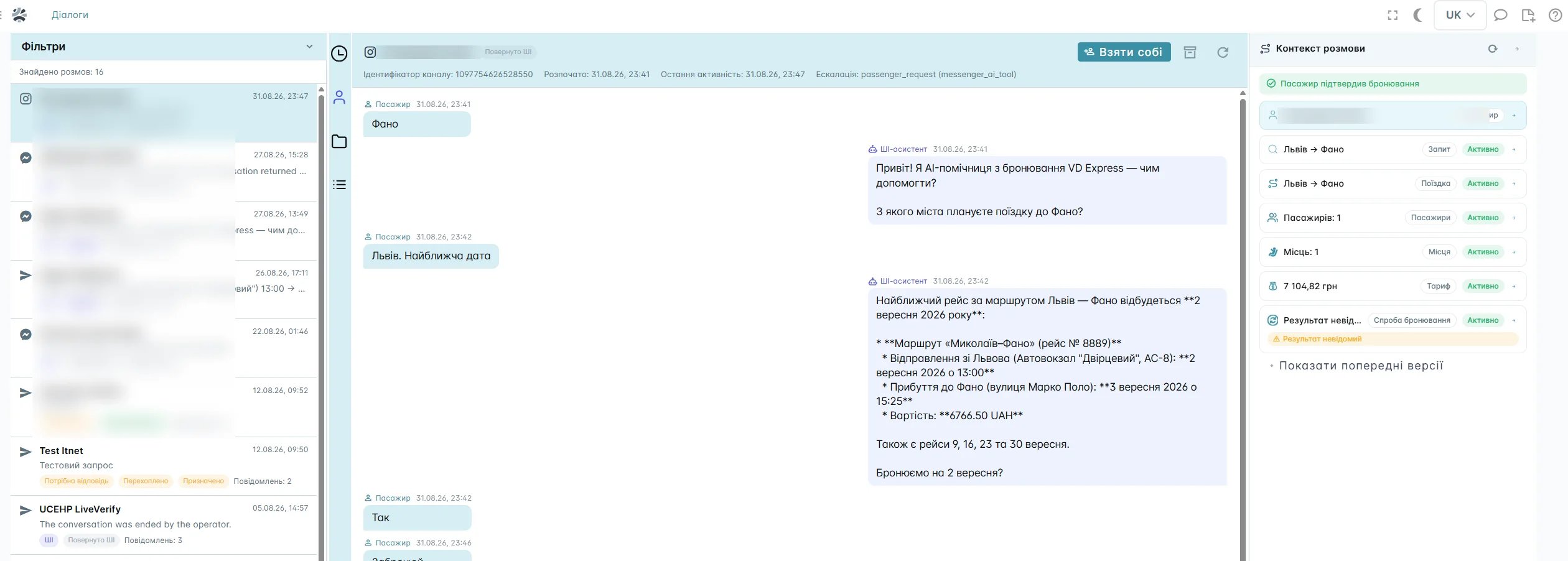
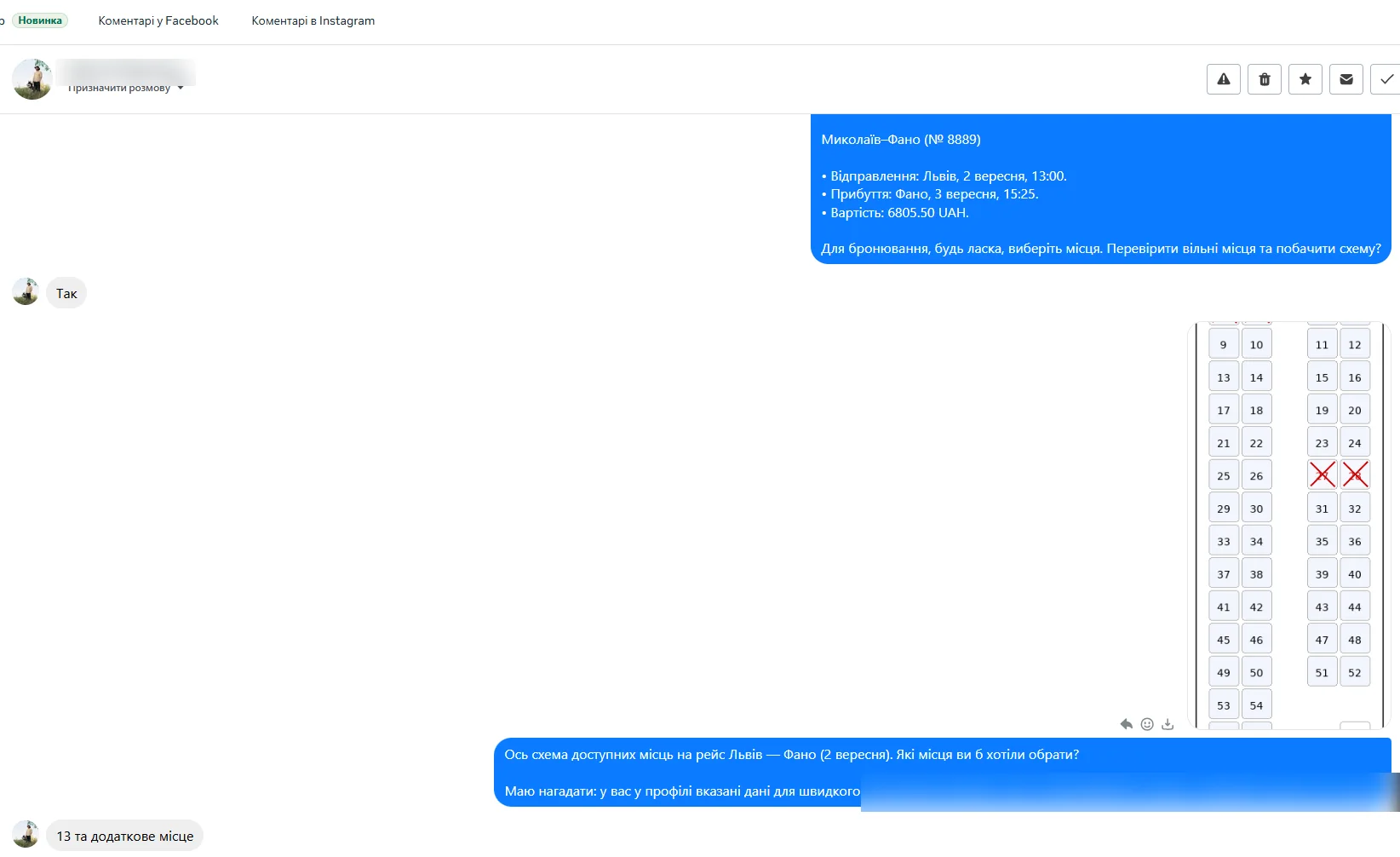
Passenger messages from Instagram Direct, Facebook Messenger and Telegram arrive in a single BUSPORTAL queue. An operator can reply from the web interface or from a staff chat in Telegram. The bot finds the trip, lets the passenger pick a seat on the real cabin layout, creates the booking and sends the payment link. When a human is needed, it hands the operator the conversation, the collected data and the full message history.
- Free testing with Live Pilot
- Help with connecting the channels

- Instagram Direct, Facebook Messenger and Telegram in one place
- replies from the BUSPORTAL web interface or from a staff chat in Telegram
- sign-in and recognition of returning passengers
- bots that take a booking all the way to the payment link
- seat selection in the chat on the real cabin layout
- quick switch from the bot to an operator
- conversation, booking and trip history in one profile
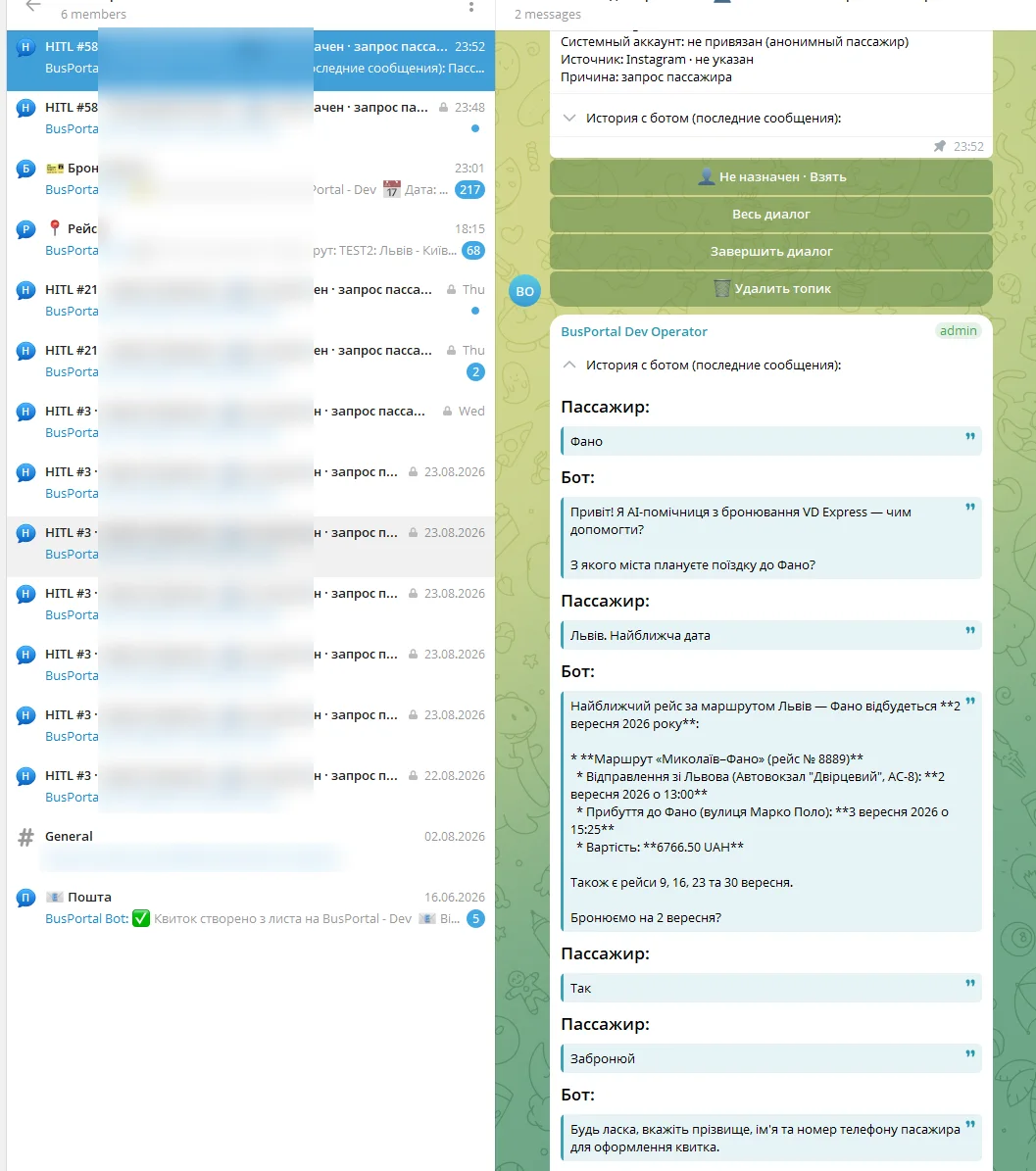

Different messengers — one conversation
Passengers write in different messengers — the operator replies from the web interface or Telegram
A passenger can write to the operator in Instagram Direct, Facebook Messenger or Telegram. Every message lands in a single BUSPORTAL conversation list, so your staff do not have to check each channel separately.
An operator can work from the BUSPORTAL web interface or reply from a staff chat in Telegram. For each operator the staff chat is set up as a separate Telegram forum group, and every conversation with a passenger gets its own topic.
In the web interface an operator sees new and open requests as well as conversations handed over by the bot. A conversation can be taken or intercepted, the passenger answered and their data reviewed. Archiving is available only for a conversation run by the AI; while a live operator is working with the passenger, the archive button is locked.
Handing a conversation back to the bot or over to another operator is done from the staff Telegram chat. If the operator does not continue, the system can also return it to the bot automatically after a configured timeout.
What this changes for the operator
- messages no longer get lost between different accounts
- you can see which requests are still waiting for an answer
- operators work with one shared conversation history
- replies can go out from the web interface or the staff Telegram chat
- a conversation can be passed to another operator from the staff Telegram chat
- the passenger gets help in the messenger they already use
- bookings no longer depend on phone calls and the dispatcher’s working hours
Bot
The bot takes the booking and sends the payment link
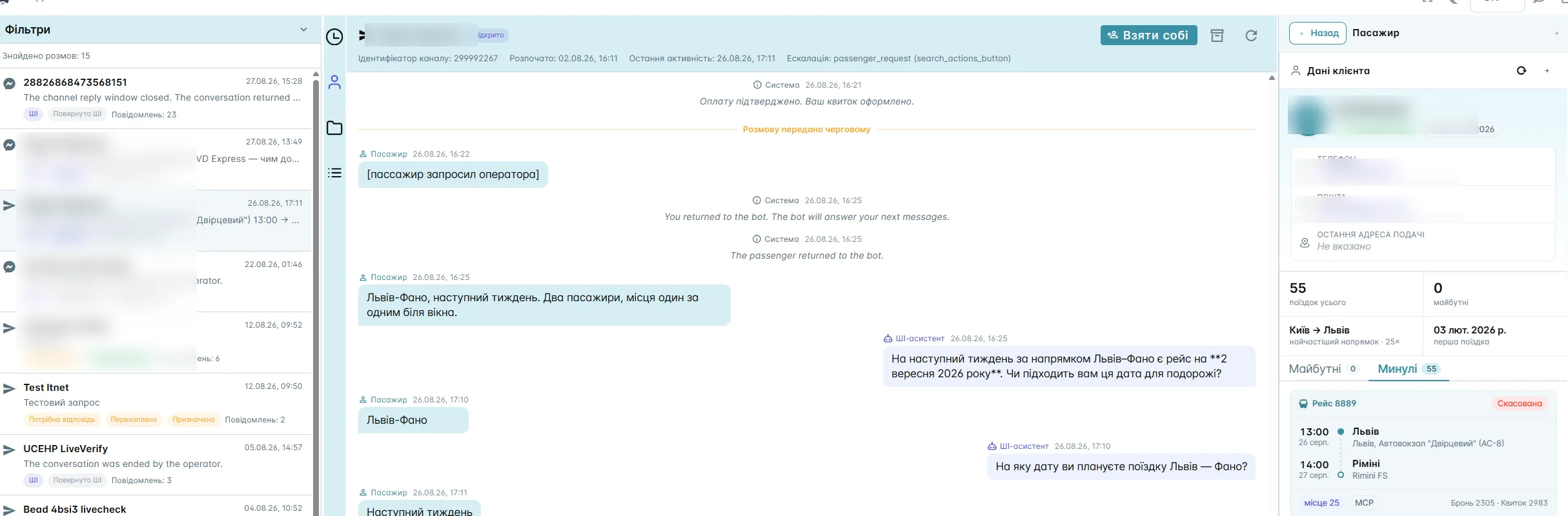
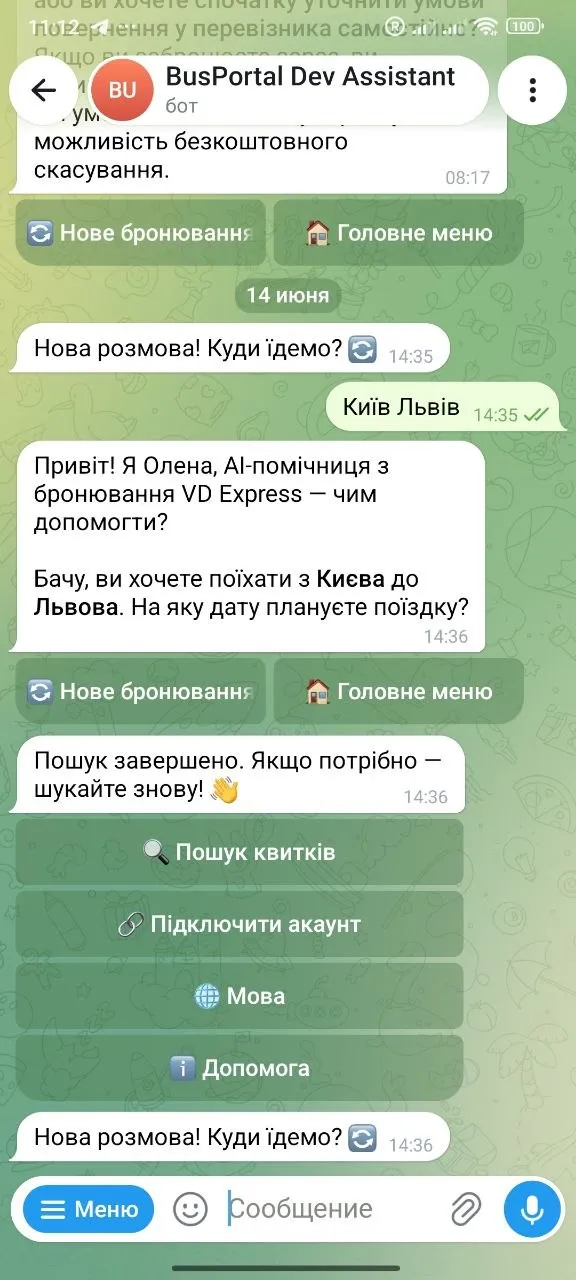
Once connected, the bot starts handling a request as soon as the passenger writes. It clarifies the direction and the date, finds the trip, shows the available seats and walks the passenger through to a completed booking.
The bot can help a passenger:
- State the departure and arrival cities.
- Choose the travel date.
- Find an available trip.
- Pick a seat right in the chat on the real cabin layout of the bus.
- Provide the passenger details and complete the booking.
- Receive the payment link — in Facebook Messenger it arrives as a separate button.
- Reach an operator if the request needs a human.
The bot works with live BUSPORTAL trips and seats and creates the booking in the system itself. The operator does not have to re-enter anything from the messenger into the booking system.
From the bot to an operator
From the bot to an operator — without repeated questions
If the passenger asks for help or the bot cannot finish the scenario, the conversation is handed over to an operator. The earlier messages and the data already collected are kept together with it.
The operator sees where and when the passenger plans to travel, which options the bot has already offered and at which step the question came up. The passenger does not have to explain the route, the date and the number of seats again.
The operator can pass the conversation to another member of staff or hand it back to the bot from the staff Telegram chat. It can also return automatically after a configured timeout. There is no separate hand-back button in the web interface.
The bot takes on the routine questions and the initial trip search. The operator steps in when a human decision is genuinely needed.
Sign-in
Sign-in for returning passengers
An existing customer can sign in right in the chat. In Instagram Direct and Facebook Messenger the confirmation code arrives by email and is entered in the same conversation — there is no need to go to the website. After sign-in BUSPORTAL links the conversation to the passenger card, so the operator knows who they are talking to and can answer with the previous trips in mind.
Before sign-in the customer card and all personal data are hidden completely.
The card of a signed-in passenger shows:
- name and contact details
- the date of the first booking — the «Customer since…» mark
- the date of the first trip
- the «trips in total» figure, which counts every booking, upcoming ones included
- upcoming bookings
- past trips
- the single most frequent direction and the number of trips on it
- details of a particular booking or ticket
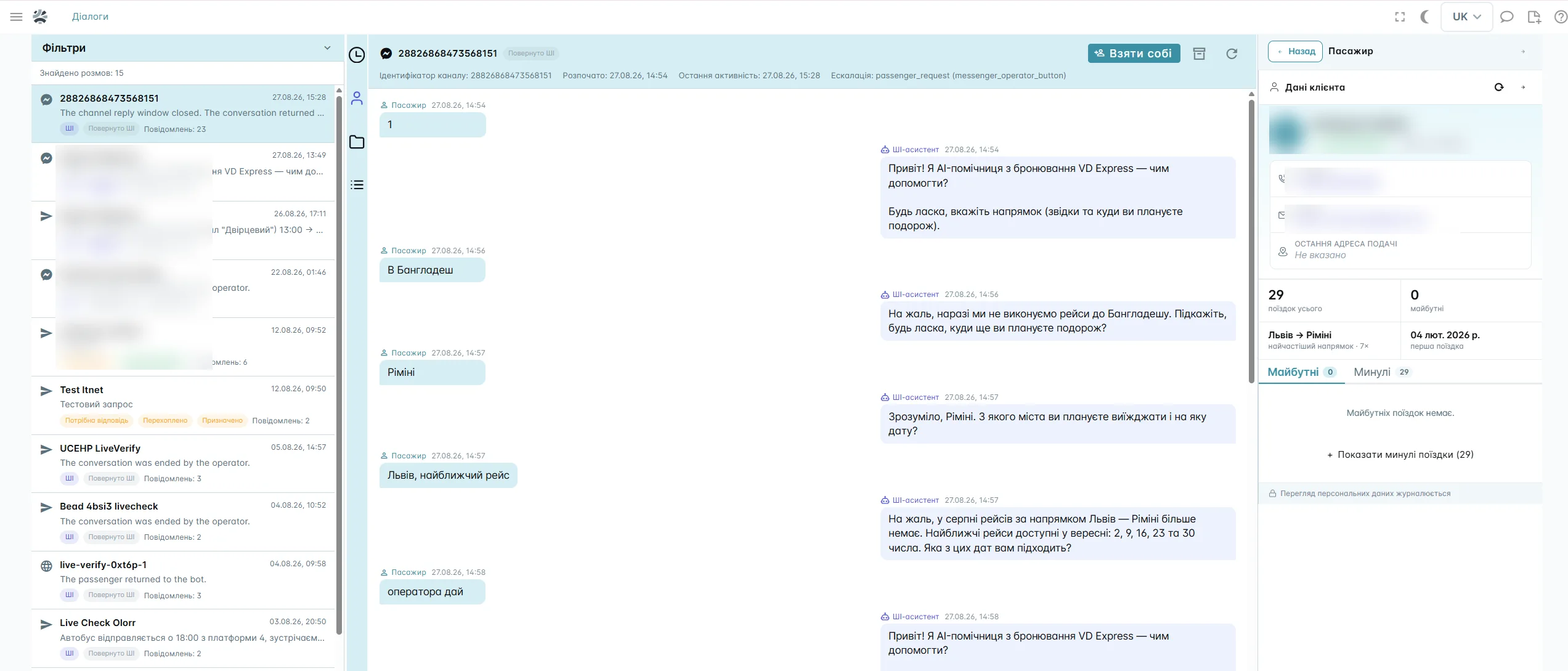
This helps most when a returning customer asks about an upcoming trip, a change to a booking or another ticket on a familiar route. The operator sees the context and gets to the answer faster.
Different messengers — one conversation
Fewer lost requests and less manual work
When requests arrive in several messengers at once, a member of staff may miss a message, answer late or lose data while transferring a booking. A single conversation queue helps you keep track of requests whatever channel the passenger wrote from.
BUSPORTAL helps you:
- answer new requests faster
- take requests outside working hours with bots
- reduce repeated data entry
- keep the context when a conversation changes hands
- see requests left without an answer
- keep the history of every returning customer
- turn a conversation into a booking inside one system
Signing in turns an anonymous message into a clear request from a particular passenger. The operator sees which routes the person used before and can help with the new trip faster.
Trip history is also the basis for personal communication. An operator can build passenger segments from past trips, run campaigns for them and use promo codes. A specific offer is sent according to the rules and permissions the operator has configured.
One profile
One passenger profile instead of separate chats
An ordinary messenger keeps the messages only. BUSPORTAL brings the conversation together with the passenger data, the bookings and the trips.
| In an ordinary messenger | In the BUSPORTAL multichannel chat |
|---|---|
| You only see the messages | You see the messages and the passenger card |
| Trip history has to be looked up separately | Past and upcoming trips are available next to the conversation |
| The passenger repeats their details after a hand-over | The conversation history stays with the operator |
| A booking is transferred by hand | The bot works together with the booking system |
| Requests are scattered across apps | Every connected channel is gathered in one list |
Connection
How the multichannel chat is connected
We choose the channels
Together we decide which Instagram Direct, Facebook Messenger and Telegram pages and accounts need to be connected.
We set the bot up
We connect the trip search, booking and hand-over scenarios to match the way the operator works.
We give the staff access
Operators get their own accounts and the privilege to work with conversations. A member of staff with that privilege sees every conversation, and «My queue» works as a filter rather than an access limit.
We check it on real requests
We test passenger sign-in, trip search, seat selection, booking, sending the payment and switching between the bot and an operator.
We launch and support it
The BUSPORTAL team helps with the initial setup and with running the connected channels.
Access control
Access to passenger data is controlled
The customer card opens only after the passenger signs in and is hidden completely without it. Staff access to personal data is defined by their rights in the system, and every view of such data is logged. The interface says so while you work with the card.
The operator gets a managed workflow rather than a shared password to a social network page: every member of staff works under their own account and performs only the actions available to them.

The multichannel chat works together with the other BUSPORTAL tools
The chat is not a separate program cut off from the trips. It runs inside BUSPORTAL together with the booking system, the passenger CRM, the seat layouts, the tickets and the trip history.
That gives a request a clear path:

- Passenger messageTrip search by the botSeat selectionBooking
- Payment linkOperator help if neededThe trip saved in the customer profile
More about the neighbouring tools:
Questions and answers
Which channels can be connected to the multichannel chat?
Instagram Direct, Facebook Messenger and Telegram are connected to the single BUSPORTAL queue. Requests from these channels appear in one conversation list.
Can the bot take a booking on its own?
Yes. The bot clarifies the direction and the date, finds the trip, shows the real cabin layout, lets the passenger pick a seat, creates the booking and sends the payment link. In Facebook Messenger the payment link arrives as a separate button. If help is needed, the passenger can move on to an operator.
What happens when a passenger asks for an operator?
The conversation goes to the operator queue together with the message history and the data already collected. The member of staff continues from the point where the bot stopped.
Where can an operator reply to a passenger?
An operator can run the conversation in the BUSPORTAL web interface or through a staff chat in Telegram. A separate forum group is created for each operator, and every conversation with a passenger opens in its own topic. That makes it possible to work with requests both at a computer and from a phone.
Can a conversation be passed to another operator?
Yes. A conversation can be passed to another operator from the staff Telegram chat. The new operator gets the message history and the data the bot has collected so far.
Can an operator hand a conversation back to the bot?
Yes, but this is done from the staff Telegram chat. There is no separate hand-back button in the web interface. The system can also return the conversation to the bot automatically after a configured timeout.
How does the system know that a returning passenger has written?
The passenger signs in, after which the conversation is linked to their existing card in BUSPORTAL. In Instagram Direct and Facebook Messenger the confirmation code arrives by email and is entered right in the conversation — there is no need to go to the website. Until sign-in is complete, the card and the personal data are hidden completely.
What does an operator see in a passenger card?
After sign-in an operator can see the name and contacts, the date of the first booking, the date of the first trip, the «trips in total» figure, upcoming and past trips, the single most frequent direction with the number of trips on it, and the details of a particular booking or ticket. The «trips in total» figure counts every booking, upcoming ones included.
Can an operator always reply to a passenger?
Each channel has its own reply window. If the passenger has not written for a long time, a new operator message may not be delivered because of that messenger’s rules. The bot warns in advance that the reply window is about to close.
Does the passenger need to install a separate app?
No. The passenger talks to the operator in the connected messenger they already use.
Is the conversation history kept after a hand-over to an operator?
Yes. The operator receives the earlier conversation history, so the passenger does not have to repeat the route, the date and the other details they have already given.
Is the passenger’s personal data protected?
Before sign-in the customer card is hidden completely. After sign-in, access to personal data depends on the role and rights of the member of staff. Every view is logged, and the interface says so while you work with the data.
Can the chat be used together with the CRM and the booking system?
Yes. The multichannel chat runs inside BUSPORTAL together with the passenger profiles, the trips, the seats, the bookings and the trip history.
We will show the chat on your own scenarios
Tell us which messengers your passengers write to you in and how your team takes bookings today. In the demo we will walk the path from the first message and the trip search by the bot to the hand-over to an operator and the trip appearing in the card of a signed-in passenger.
- Free testing with Live Pilot
- Help with connecting and setting up