

Dispatch software for bus operators
Trips, drivers, passengers, GPS and transfers — in one workspace. AI turns notebook photos and voice notes into bookings ready for review.
The dispatcher sees the whole operation in one web interface: upcoming and active trips, bus occupancy, vehicle locations, passenger lists, payments, transfers and operational issues.
We will show the dispatch system on your own company's routes.
Software for managing buses and trips
BUSPORTAL is software for bus operators that helps manage trips, schedules, buses, drivers, ticket sales and dispatcher work in one system.
Learn more: Bus fleet management software
Success stories
Results at VD-EXPRESS
For the international carrier VD-EXPRESS, BUSPORTAL brought together the online sales website, bookings, trips, passengers, transfers, drivers, GPS monitoring and finances.
After the implementation the carrier halved the time it takes to board passengers, eliminated double bookings and moved trips off paper documents entirely.
Learn more: The VD-EXPRESS automation story600+
bookings per month
11
vehicles
8
transfer geo zones
25%
of tickets sold online
The whole dispatch desk on one screen
Instead of separate spreadsheets, chats and calls, the team works with a single set of up-to-date data. Each employee sees only the sections and actions available to them.
01Trips and schedules
Regular and one-off departures, stops, fares and international time zones in one calendar.
02Buses and drivers
Crew assignment, capacity control, schedule conflicts and vehicle readiness for departure.
03Passengers and seats
Up-to-date trip list, payment statuses, luggage, transfers and protection against double-selling seats.
04GPS tracking
Bus position, speed, next stop, ETA, deviation from the schedule and movement history.
05Transfers
Grouping requests, distributing them across cars, optimising addresses and tracking completion on the map.
06Operational incidents
Copilot highlights trips without resources, unassigned transfers and critical messages from drivers.
routes
Managing bus routes
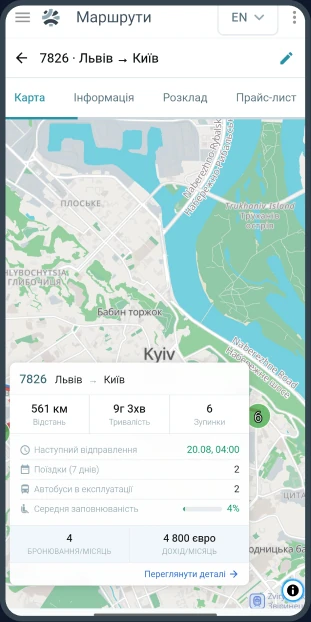
A route in BUSPORTAL is not just a direction in the timetable but the full structure of the service: the sequence of stops, the running times between them, the fares for different pairs of cities, the operating calendar and the buses that serve the route.
Trips are created from the route according to the calendar it is given. Changes to the timetable or to the itinerary can therefore be applied to future trips without editing every journey by hand.
The dispatcher can:
 change the departure or arrival time
- add, remove or move a stop
- assign a different bus
- close sales in a particular channel
- cancel an individual trip
Before a change is made, the system shows its consequences: how many tickets have already been sold, which passengers have to be notified and which seats or bookings need attention.
Importing stops from XLSX
When there are many routes, the list of stops can be uploaded from an XLSX file. For every stop it holds:
- the sequence number
- the name
- the geographic coordinates — latitude and longitude
- an additional comment
This speeds up the initial setup of the system and reduces the number of mistakes made when routes are entered by hand.
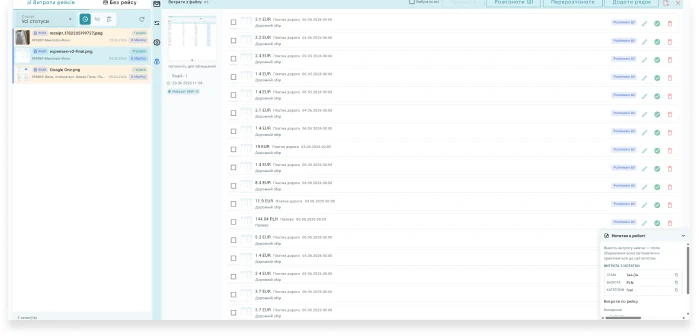
From a photo or a voice note to a structured request
BUSPORTAL recognises passengers, phone numbers, the date, the direction and seat preferences. It then checks the data against current trips and the seat map.
- one photo can contain several bookings;
- the voice message is stored together with its transcript;
- no ticket is created without the dispatcher's confirmation;
- before saving, the system re-checks seat availability.
Instead of re-typing every passenger, the dispatcher hands the source data to the system, reviews the AI-prepared suggestions and confirms the booking.
The dispatcher sees the whole picture instead of piecing it together
- passenger name;
- phone number;
- travel date;
- departure and destination point;
- number of passengers;
- the seat numbers stated;
- additional notes;
- several bookings on one page.
Active trips, tickets sold, latest bookings, vehicles on the map and open incidents all update in a shared operations panel.
the trip - in your phone
The bus on the map. The trip in the driver's phone
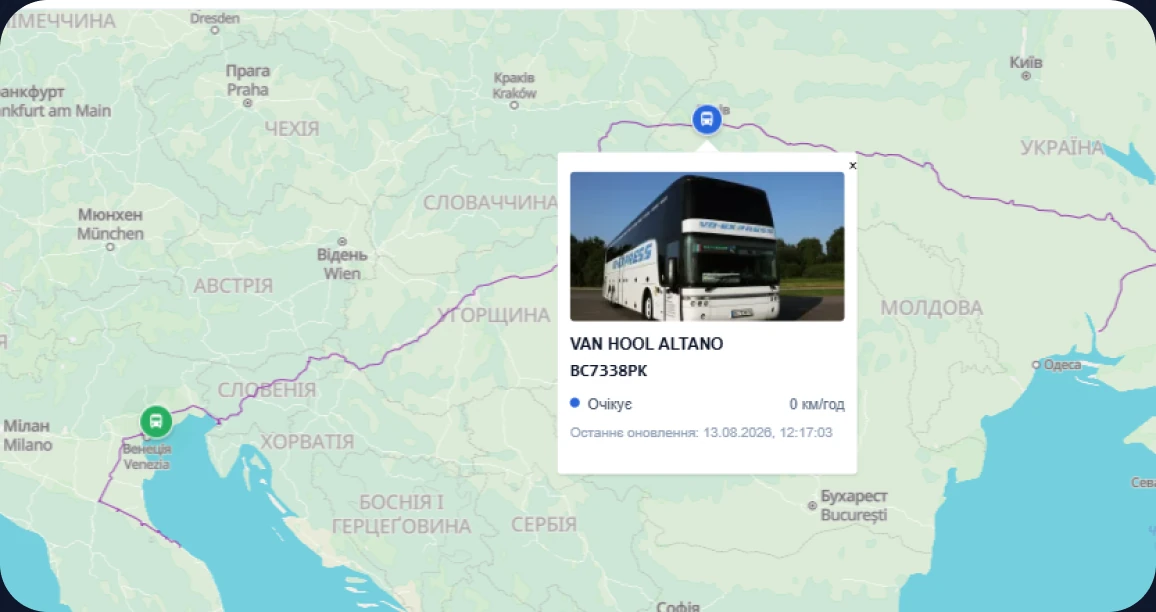
BUSPORTAL combines coordinates from Teltonika hardware trackers and software GPS in the driver app. The dispatcher sees the more current source in a single monitoring view.
- assigned trips and the sequence of stops
- up-to-date passenger list and payment statuses
- QR ticket scanning and boarding control
- GPS coordinates sent from the smartphone
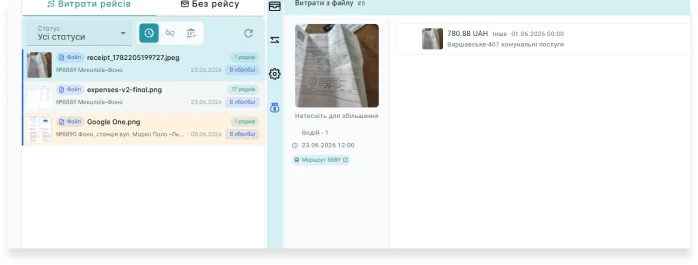
- receipts, expenses and messages to the dispatcher
Learn more: Driver app
notes
Notes as a shared workspace
Text entries, photos, files, audio and Telegram messages can all be collected on a shared notes board.
The original photo, text or audio recording is kept as the source. The recognition result is a separate layer that can be checked and corrected. This is especially useful when bookings come from agents, drivers, partners or staff who are used to passing information by voice or writing it down by hand.
What you can do with a note:
- pin it
- assign it to a responsible employee
- attach files to it
- set a reminder
- find it by text or by the voice transcript
- turn it into one or several bookings
- send it to the archive once handled
- review it alongside the original source

Drivers
Driver records and trip assignments
Driver records are kept together with the trips rather than as a separate list. You can see who is assigned to each trip, which bus is attached to them and whether the driver has accepted the trip in the app.
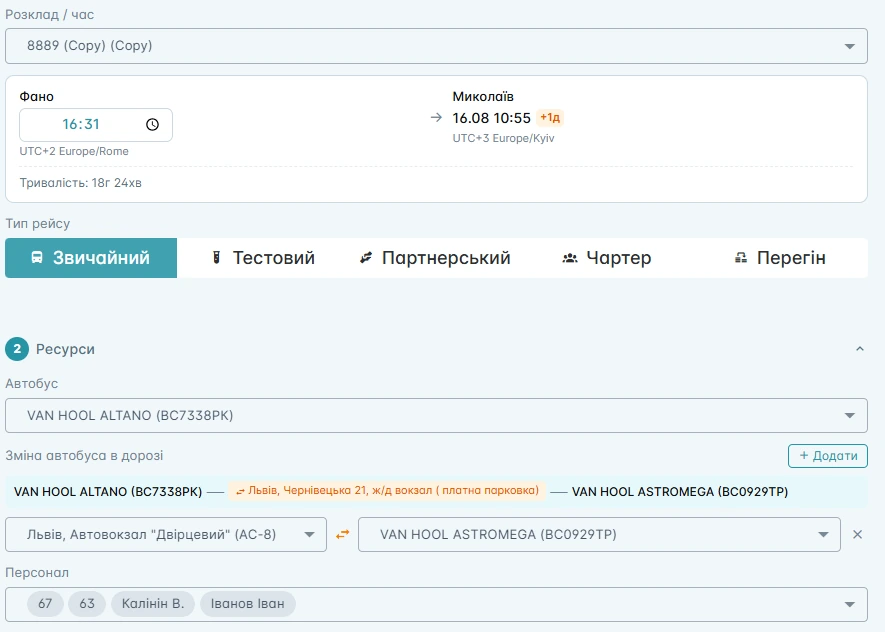
Before departure, the dispatcher assigns a vehicle and a driver to the trip.
The system shows:
- available buses;
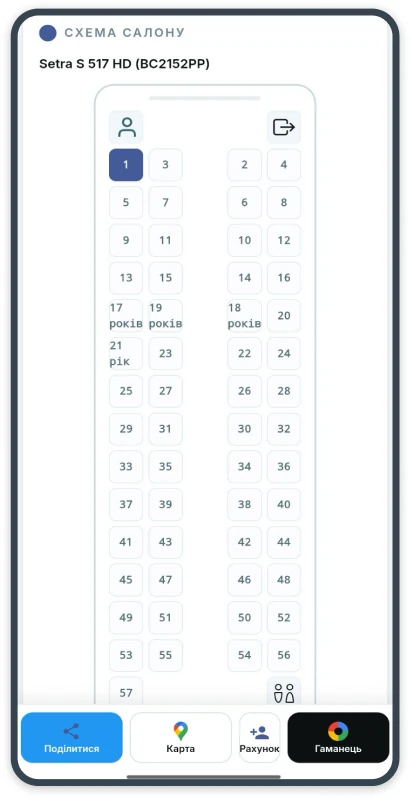
- capacity and seat map;
- vehicle equipment;
- current bus status;
- assigned drivers
- overlaps and conflicts in the schedule;
- a planned bus swap during the trip;
- how full the bus is.
If a vehicle has to be replaced, the dispatcher can assign another bus and check that its seat map matches the bookings already made.
Learn more: Driver mobile app
trips and schedule
No passenger gets lost between the address and the bus
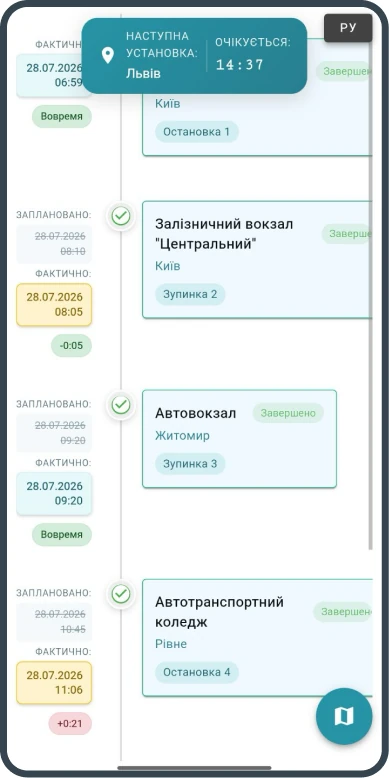
The system collects pickup requests, distributes them across cars and helps build a realistic route that reaches the main trip before it departs.
The system:
- groups requests by zone and boarding time
- accounts for the number of people, seats and luggage
- calculates the order of addresses and the pickup times
- lets the dispatcher change the car manually
- passes the confirmed route to the driver
The system creates future trips automatically from the schedule. Tickets already sold are kept even after the route template changes or the schedule is regenerated.
Learn more: Transfer system
operations panel
What the dispatcher sees in a single workspace
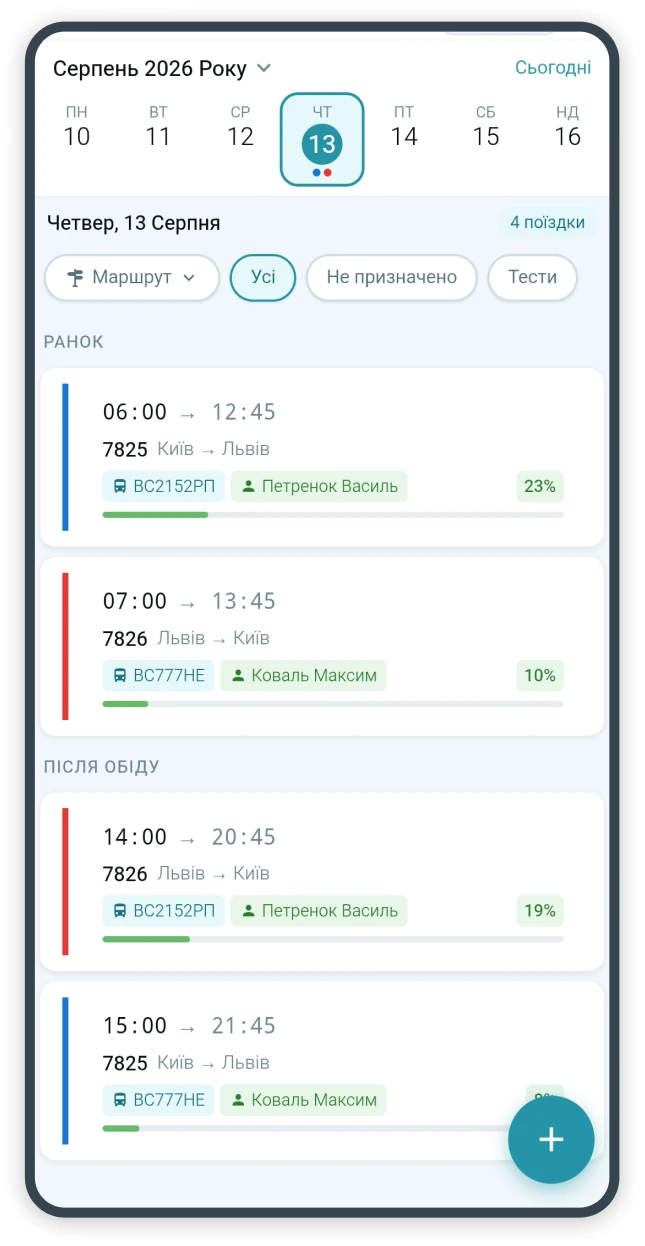
The BUSPORTAL main panel shows the current state of the company's operations.
The dispatcher can see:
- active trips
- bus locations on the map
- scheduled departures
- the number of tickets sold
- the latest bookings
- transfers that are not assigned yet
- trips with no bus or driver assigned
GPS
Real-time GPS tracking for buses
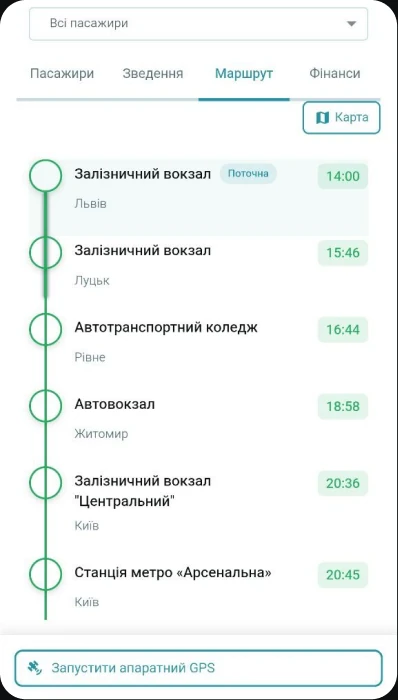
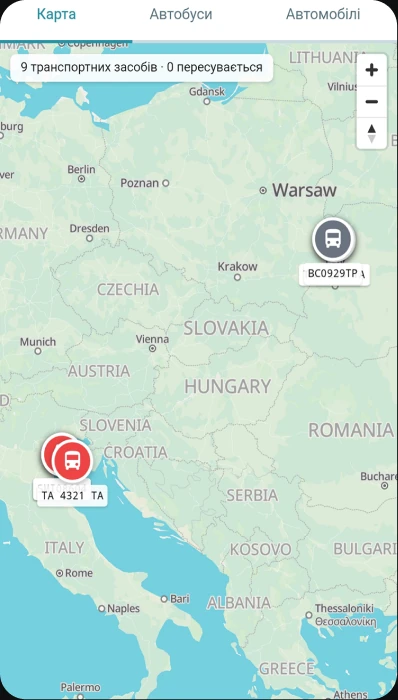
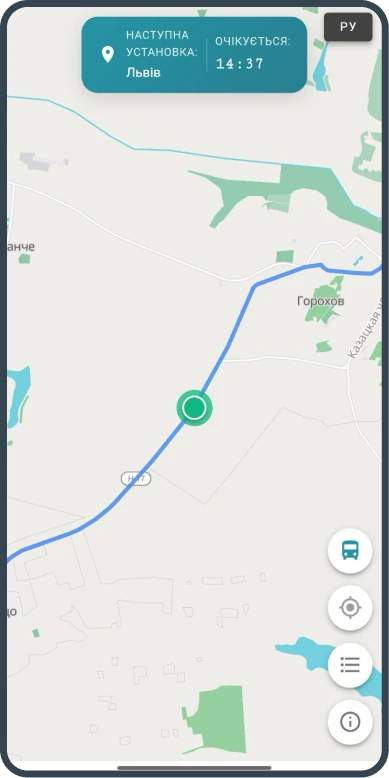
BUSPORTAL shows where vehicles are on the map and links GPS coordinates to a specific trip. The dispatcher sees:
- the current bus position
- direction and speed of travel
- the route covered
- the next stop
- the estimated arrival time
- deviation from the schedule
- trip status
- movement history
- the stops the bus has already passed
Learn more: Bus GPS tracking
BOARDING CONTROL
Passenger list and boarding control
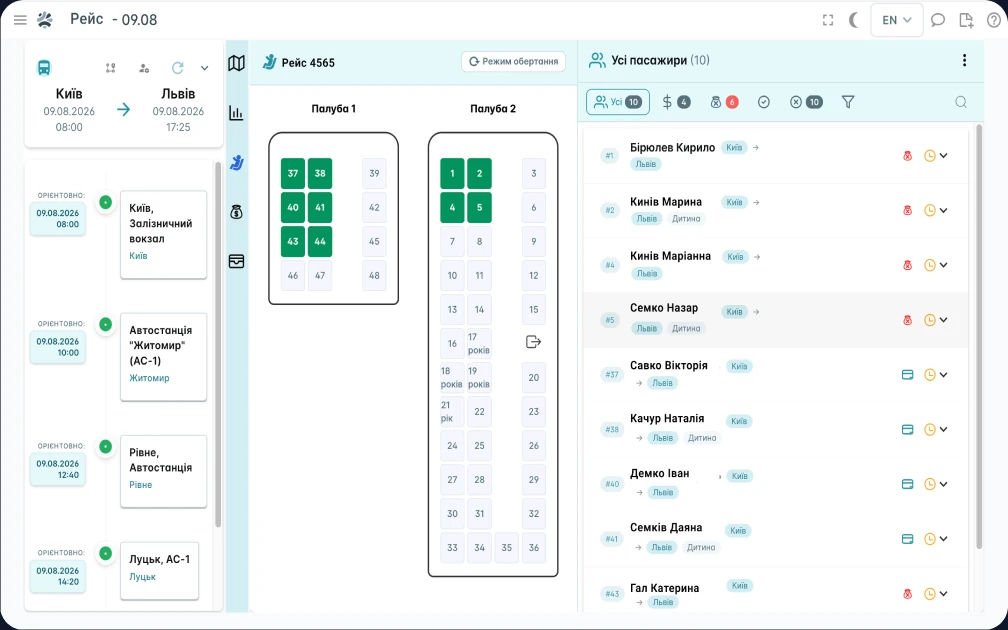
The dispatcher and the driver work with an up-to-date passenger list built from bookings.
It shows:
- passenger name;
- phone number;
- seat on the bus;
- boarding and drop-off point;
- ticket status;
- payment status;
- luggage;
- extra seat;
- the transfer booked;
- any notes required.
New bookings and changes reach the list without being re-entered by hand.
Learn more: Bus booking system
CHANGES
Changing or cancelling a trip
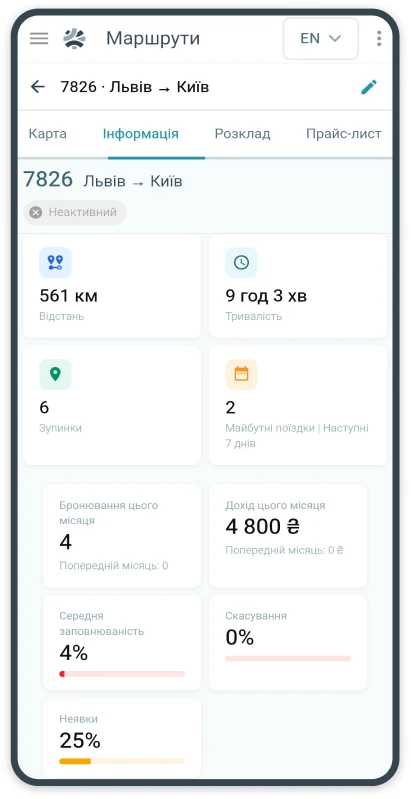
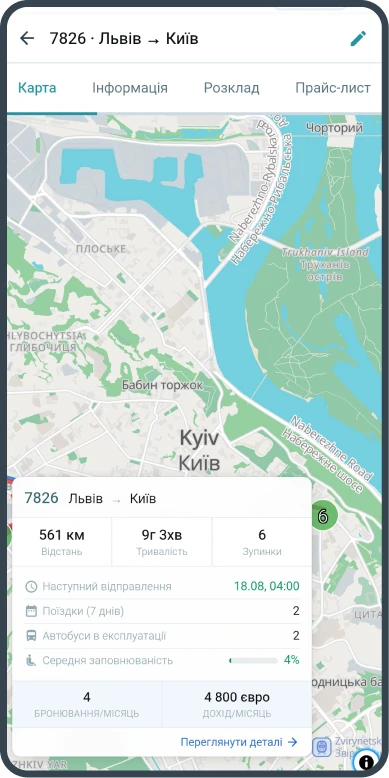
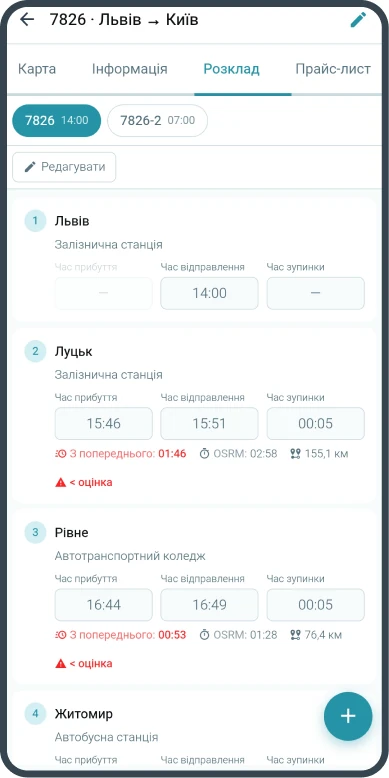
Before the trip time is changed, BUSPORTAL can show how many passengers it will affect.
The dispatcher can change the time, apply the change to future trips, notify passengers, swap the bus or the driver, or cancel an individual departure.
Passengers can be sent the updated details through the connected communication channels. Times in the messages follow the local time zone of the relevant stop.
trip control
Trip control from creation to closing
In BUSPORTAL the whole life cycle of a trip is controlled in one place: creation from a route, assigning the bus and the crew, ticket sales, passenger boarding, movement tracked by GPS and closing with a financial report. The dispatcher does not have to switch between different programs to check the state of a trip.
Before departure the dispatcher sees:
- the assigned bus and drivers
- the number of seats sold and still free
- the passenger list and their boarding points
- the statuses of bookings and payments
- extra services and paid luggage
While the trip is running, the current location of the bus, the stops already passed, passenger boarding and any deviation from the schedule are displayed.
Once it is over, the trip is closed, and the tickets, payments and expenses go into the financial summary. The carrier sees the revenue, the split of money by payment method, the fuel costs and the crew's other expenses.
trip documents
Trip documents and exports for reporting
From the trip data BUSPORTAL automatically builds the working documents: the passenger list and the cash report. They can be exported in XLSX format for the accounts department, for internal control and for further processing.
The passenger list holds the passengers' surnames, the seat numbers, the boarding and drop-off points and the other details needed to run the journey.
The cash report holds every payment for the trip, converted into a single currency and broken down by payment method — online payments, bank transfers and the cash taken by the driver or the cashier among them.
Access to viewing and exporting the documents is limited by the roles and permissions of the staff. Passenger and financial data is seen only by users who have been given the matching access.
Step by step
From your spreadsheets to a working dispatch desk
 We analyse the process
Routes, schedules, fleet, staff roles and sales channels.
 We configure the system
We move over stops, vehicles, seat maps and the rules for running trips.
 We connect GPS
We integrate the trackers you already have or switch on GPS in the driver app.
 We start the team up
We train dispatchers and drivers on the company's real routes.
 Control
The team starts working with trips, the map and transfer assignments in one web interface.
 24/7 support
Our team is always in touch to help you with any question about a trip.
The BUSPORTAL configuration adapts to each carrier's own processes.
comparison
Manual dispatching or BUSPORTAL
The difference is not the number of screens, but whether the team has to move the same data between spreadsheets, chats and phone calls.
| Process | Spreadsheets, chats and phone | BUSPORTAL |
|---|---|---|
| Requests from a notebook | Re-typed by hand | AI prepares the requests for review |
| Trips and resources | Spreadsheets, calendars and calls | One operations panel |
| Tracking the bus | Checking by phone | Live GPS map and ETA |
| Passenger lists | Compiled before departure | Updated from bookings |
| Transfers | Addresses in chats | Assignment and route optimisation |
| Breakdowns | Messages can get lost | Priority incident in Copilot |
Frequently asked questions
Can BUSPORTAL be used only as dispatch software?
Yes. The set of modules and integrations is defined to match the carrier's processes.
Can BUSPORTAL create a booking from a photo of a notebook?
Yes. The dispatcher uploads a photo of the notebook page, and the system recognises the passenger name, phone number, travel date, departure and destination point, number of passengers, the seat numbers stated and additional notes. One photo can contain several bookings — the system parses each of them separately. The original photo is kept as the source, and the recognition result is a separate layer that can be checked and corrected.
Are voice bookings supported?
Yes. The voice message is stored together with its transcript, so the note can be found later both by text and by the voice transcript. This is especially useful when bookings come from agents, drivers, partners or staff who are used to passing information by voice. The audio recording stays as the source — it can always be played back next to the recognised text.
Does the AI create bookings automatically?
No. No ticket is created without the dispatcher's confirmation: the system only prepares suggestions from the recognised data and checks them against current trips and the seat map, while the decision is made by a person. Instead of re-typing every passenger, the dispatcher hands the source data to the system, reviews the prepared suggestions and confirms the booking.
What happens if the chosen seat is already sold?
Before saving, the system re-checks seat availability, so a taken seat cannot be sold twice. If the seat named in the request has already been bought, the dispatcher sees it at the confirmation step and picks another one on the seat map. Protection against double-selling seats works the same way across all channels — the website, the bots, the admin panel and the driver app.
Do existing GPS trackers have to be replaced?
Usually not. The platform is not tied to a single manufacturer: devices connect through a GPS gateway if their protocol is supported or can be integrated, so existing hardware mostly does not need replacing. VD-EXPRESS, for example, uses an integration with Teltonika trackers — FMC650 and FMB920 among them — with extended telematics.
What if a bus has no GPS hardware?
If there is no hardware tracker, the coordinates are sent by the software tracker in the driver app — no separate equipment has to be bought. Without internet, the points are queued and synced once the connection is back, so areas with no coverage leave no gaps in the track. BUSPORTAL combines coordinates from hardware trackers and software GPS, and the dispatcher sees the more current source in a single monitoring view.
Can the passenger see the bus on the map?
Yes. The e-ticket has a button that opens the live map of that particular trip — no separate app to install. The passenger sees the current bus location, the route and the sequence of stops, the next stop, the estimated time of arrival and the delay against the schedule. For the carrier that means fewer calls to the dispatcher asking “where is the bus?”.
Does the system support transfers to the bus?
Yes. The system collects pickup requests, groups them by zone and boarding time, distributes them across cars and calculates the order of addresses and the pickup times, taking into account the number of people, seats and luggage. The dispatcher can change the car manually, and the confirmed route is passed to the driver in the app. The passenger buys a single ticket that covers both the transfer and the main trip.
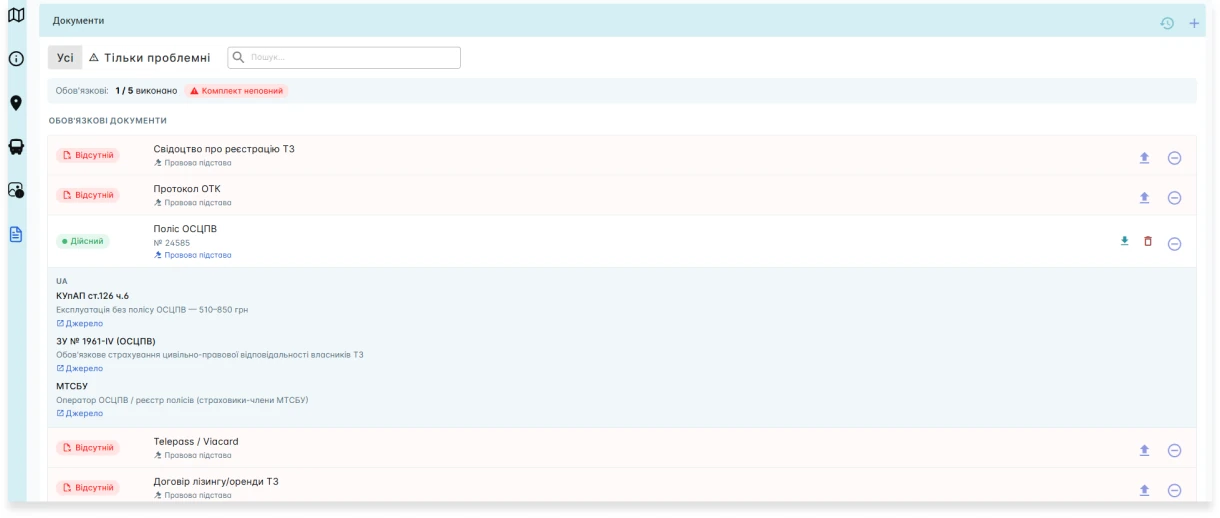
Can driver and bus documents be stored?
Yes. BUSPORTAL keeps records of driver and vehicle documents with their validity dates, and warns about documents that are about to expire. Before a trip is released, the dispatcher sees whether the vehicle and the crew are ready, so a problem shows up before departure rather than out on the route.
Can waybills be kept in BUSPORTAL?
At the moment the system produces the passenger list and the trip cash report — these are exactly the documents exported in XLSX. Waybills (often searched for as trip sheets) are not generated at present; if you need them, tell us during the implementation.
Can BUSPORTAL be integrated with other systems?
Yes. Sales can run through the website, messenger bots, the admin panel, the driver app, e-mail and partner integrations at the same time. The platform connects to the LiqPay payment service and to Viber and SMS campaigns through SMS-Fly, and the schedule is exported automatically in GTFS format for transport services, Google Maps among them. GPS hardware connects through a GPS gateway using a supported protocol.
How much does BUSPORTAL dispatch software cost?
The dispatch software is not sold separately — it is part of the BUSPORTAL subscription. The fixed fee starts at €300 per month excl. VAT and depends on the size of the fleet: up to 3 buses — €300, 4–7 buses — €500, 8 buses and more — from €700. For seasonal routes there is a second model: €150 per month plus 1% of the value of registered tickets. The subscription already includes use of the platform and service support; payment system fees and the cost of SMS/Viber are paid separately at the providers' rates. You can try it free with Live Pilot for up to 45 days, with no contract.
What software do you need to manage buses?
A bus operator needs a system for planning trips, assigning buses and drivers, tracking available seats, selling tickets and seeing how the fleet works. In BUSPORTAL these capabilities run in one account.
See your own dispatch desk running in BUSPORTAL
We will show bookings, trips, GPS, drivers and transfers on your own destinations. No theory, no generic slide decks.