

CRM for bus operators and passenger transport
Instead of scattered Excel sheets, chats, paper lists and several separate apps, the whole team works from one set of up-to-date data. The owner keeps control of the business, the dispatcher runs trips and bookings, the marketer brings passengers back for repeat journeys, and the driver gets the passenger list and the day's assignments in a mobile app.
We will show BUSPORTAL on your own company's routes.
CRM system for passenger transport
BUSPORTAL is a CRM for bus operators and a management system for passenger transport. It brings together ticket bookings, trips, routes, passengers, drivers, buses and finances.
See the price of software for a bus operatorWhy the usual methods stop working
When a carrier needs a CRM
As the number of trips and sales channels grows, manual record-keeping stops being reliable. Bookings arrive from the website, phone calls, messengers, email, drivers and partners. Every one of them has to be copied into passenger lists, checked against payment and passed on to the team with each change.
Without one CRM behind it all, this leads to the familiar problems that slow the scaling of your transport business.
BUSPORTAL creates a single source of up-to-date information for the entire transport company.
 the same seat gets promised to different passengers
- dispatchers work from different versions of the lists
- payment information sits apart from the booking
- route or time changes do not reach the driver right away
- the real occupancy of a trip is hard to see
- receipts and documents get lost in chats
- the customer base is never used for repeat sales
- the owner has no full picture of sales and expenses
Centralized records
Every booking in one system
The CRM collects bookings from every connected sales channel. The dispatcher sees where the order came from, which trip the passenger is booked on, where they board and get off, which seat they picked and whether payment has gone through.
The booking card holds:
- passenger details
- route, date and time of travel
- boarding and drop-off points
- seat on the bus
- price and payment status
- extra luggage
- ordered transfers
- the channel the booking came from
- change history
If a passenger's plans change, the booking can be edited, moved or cancelled without re-entering everything from scratch.
Customer base
A passenger database for the bus carrier
The passenger database in BUSPORTAL builds itself from bookings. Every new journey adds to the passenger card: the system stores the trip, the date, the route, the seat, the amount paid and the services ordered.
The operator finds a passenger by name or phone number and immediately sees their contacts, active bookings and travel history. There is no need to search messengers for earlier conversations or to ask again for information the system already holds.
Passengers can be grouped by destination, by how often they travel and by the date of their last journey. That makes it possible to tell regular customers from one-off travellers, to analyse demand by route and to work with specific segments instead of the whole base at once.
Access to personal data is controlled by user roles. The carrier decides who may see contacts and travel history and, if needed, limits access to the data of a particular department. An employee then gets only the information they need for their work.
No double bookings
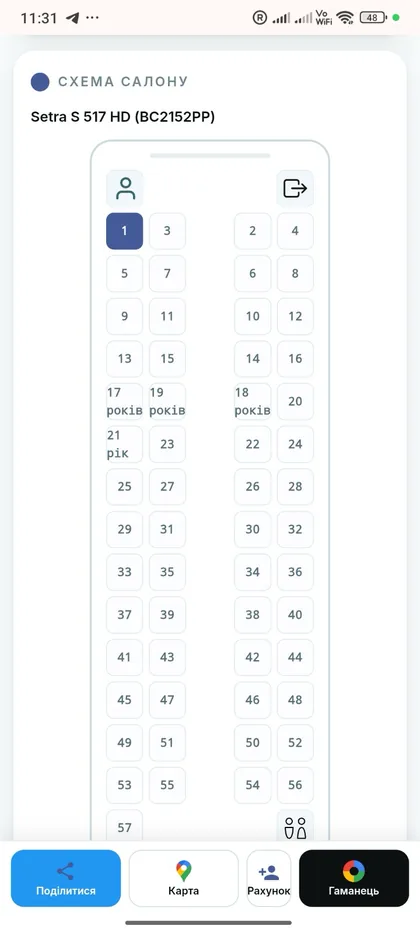
A live seat map that blocks double bookings
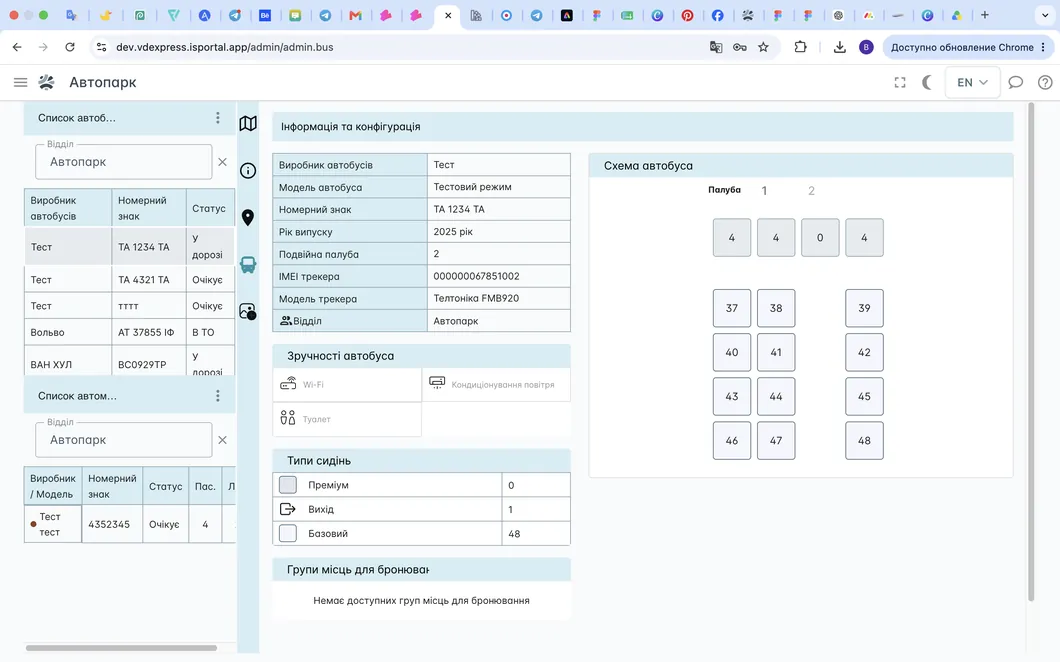
BUSPORTAL shows an interactive bus seat map with free, reserved and sold seats. Changes sync between users, so the dispatcher, the driver and the passenger all work with the same availability.
The system tracks seat occupancy and will not let a conflicting booking go through. On trips with a vehicle change, a passenger can be seated separately on each segment of the journey.
A carrier can also hold a closed seat reserve for regular, corporate or priority customers. Those seats stay out of open online sales but remain available to authorized administrators.

Flexible capacity control
Channel-by-channel control of ticket sales
Trip availability can be controlled separately for each channel. A carrier can, for example, stop new bookings on the customer website and in messenger bots while keeping sales open for the administrator.
This makes it easier to allocate the remaining seats, keep tickets back for direct sales and avoid booking beyond available capacity. The CRM records who closed a channel and when. It can be reopened later without touching the trip itself.
Controlled separately:
- customer website
- admin panel
- messenger bots
- Driver app
- Email
- partner and automated integrations
Logistics and schedule
Managing routes, trips and schedules
BUSPORTAL holds the carrier's route structure: stops, running times, schedules, city-to-city prices, buses and the drivers responsible.
- create regular and one-off trips
- set up a repeating schedule
- assign buses and staff
- keep an eye on occupancy
- change departure times
- see how a change affects existing bookings
- work with international routes and different time zones
The dispatcher no longer duplicates the schedule across several spreadsheets or updates the related lists by hand.
Direct sales
Your own online sales website
BUSPORTAL can be connected to a bus carrier's own website. The passenger finds a trip, picks a date, looks through the available seats, enters their details, pays for the order and receives an e-ticket.
Schedules, prices and seat availability come straight from the CRM. That gives you a sales channel of your own, cuts your dependence on intermediaries and gives the passenger a familiar branded interface.
Modern service for the passenger
E-ticket and live bus tracking
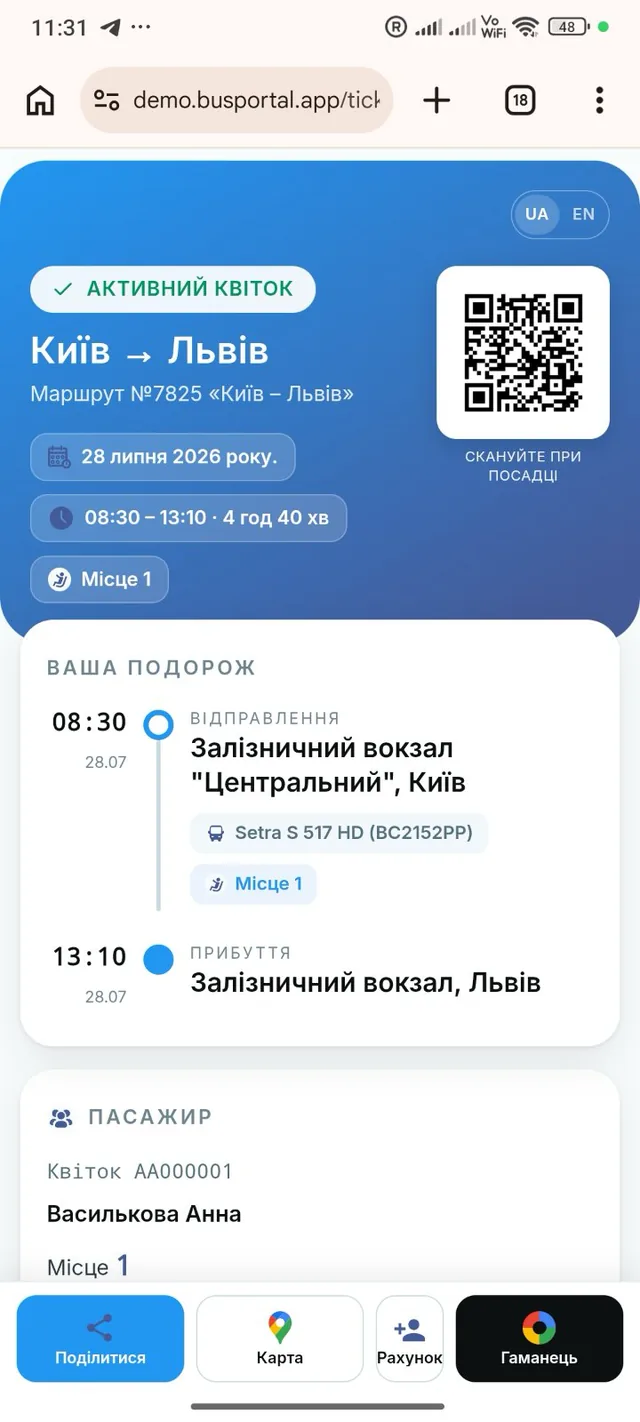
Once the order is placed, the passenger receives an e-ticket with the trip details and a QR code to be checked at boarding.
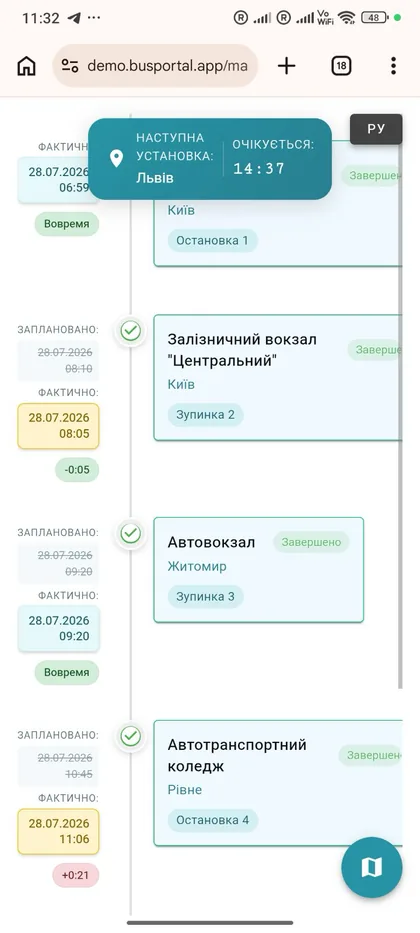
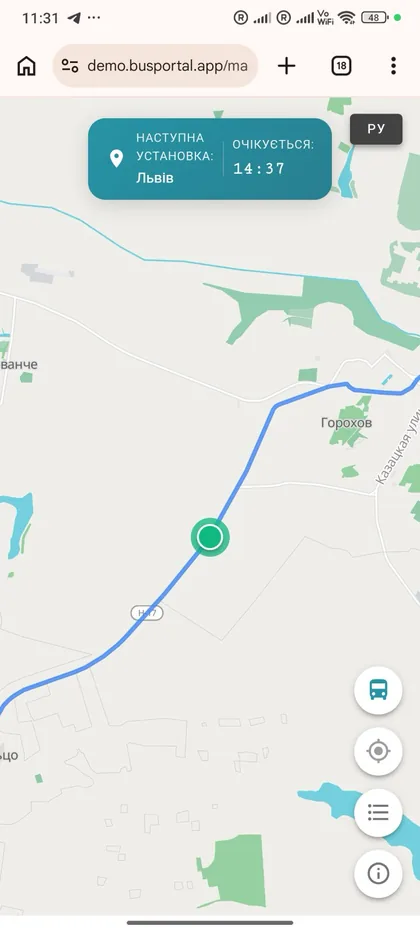
From the ticket they can open the public trip map and see:
- where the bus is right now
- the route and its stops
- the next stop
- the delay against the schedule
- the estimated time of arrival
The link can be shared with family or with whoever is meeting the passenger. That cuts down the calls to the dispatcher asking where the bus is.
Work on the road
Mobile driver app
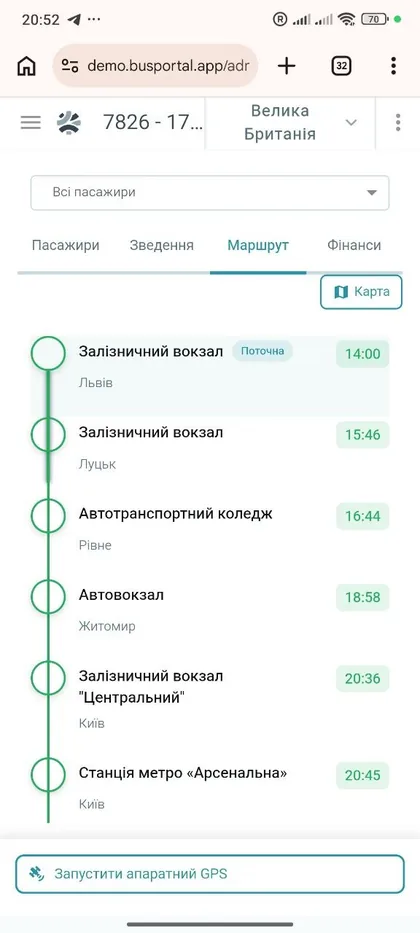
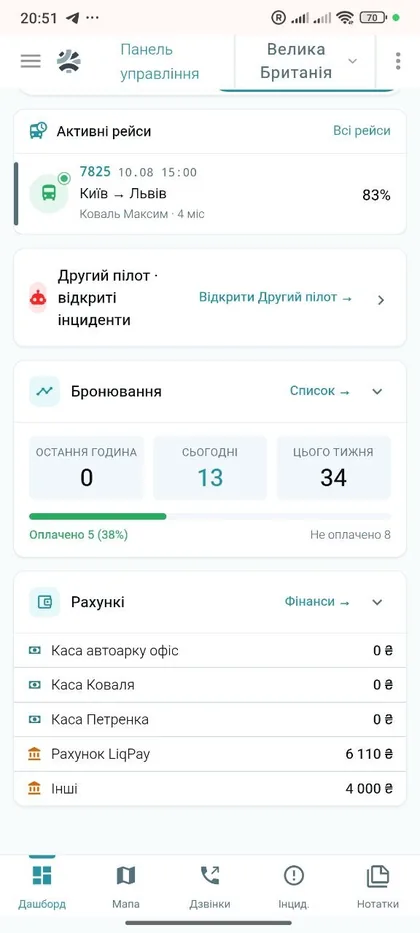
The driver gets up-to-date trip and passenger information on their phone. No waiting for a printed list, no hunting for the latest version of a document in a chat.
- passenger list
- boarding and drop-off points
- seat map
- payment statuses
- luggage and extra services
- QR ticket scanning
- boarding check-in
- GPS position reporting
- uploading receipts and documents from the trip
Changes sync with the CRM, so the dispatcher sees the current picture.
tracking
GPS monitoring for your fleet
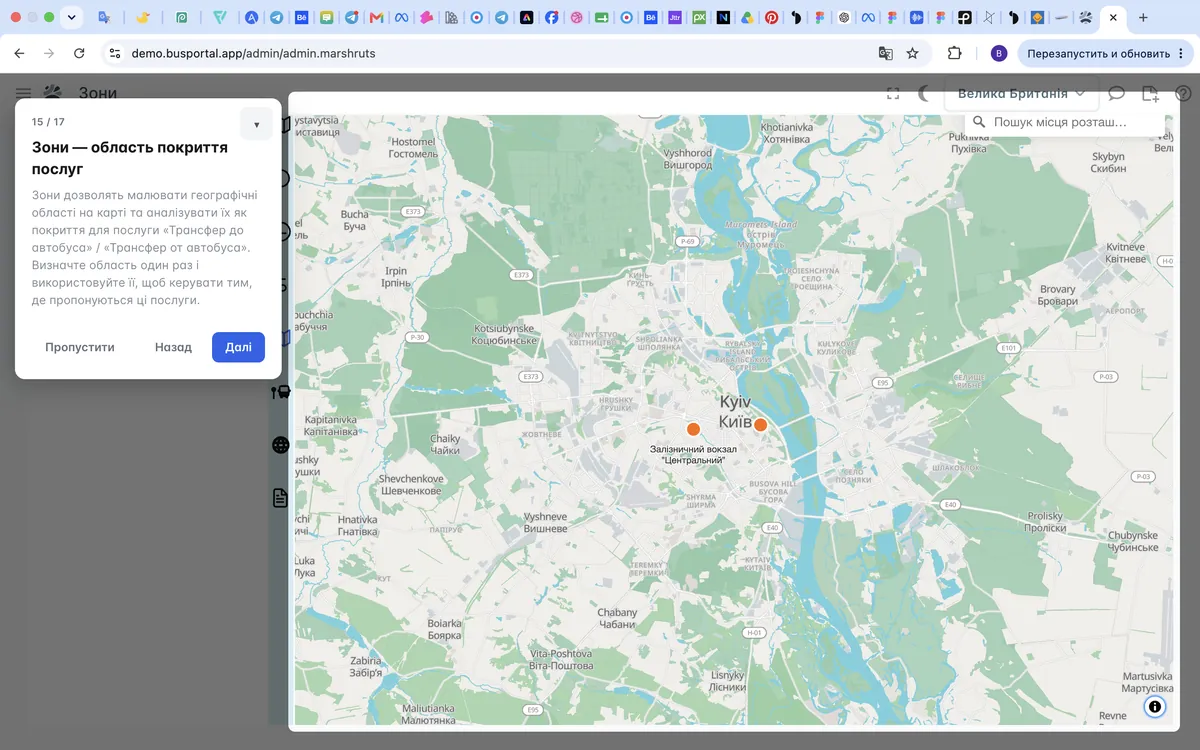
BUSPORTAL shows buses and transfer cars on a live map. The system works with Teltonika GPS hardware and with other manufacturers' devices whose protocols are supported or can be integrated.
If there is no dedicated device, the coordinates can be sent by the software tracker in the driver app.
The dispatcher sees the current position of each vehicle, its heading, route history, stops passed, delays and the estimated time of arrival.
Financial records
Financial records for bus operations
In BUSPORTAL income and expenses are tied to a specific trip. The system takes into account the tickets sold, the extra services and every cost of the journey, so the financial result of a trip is visible without merging several spreadsheets by hand.
Money is recorded on separate accounts: the cash desk, the bank account, a driver or a counterparty. Every receipt, payment or refund is stored as a separate operation. A transfer between accounts creates two linked entries — a debit from one account and a credit to the other. That makes it possible to check the movement of funds and the actual balance of each account.
Trip expenses are split into categories: fuel, tolls, crew meals, repairs, parking and other costs. A photo of a receipt or another supporting document can be attached to the operation.
If a driver or another crew member pays for something on the road, the expense is recorded in the system and assigned to that particular trip. Once the trip is over, the carrier sees:
- the income from tickets and extra services
- the expenses by category
- how the money was received and where it is held
- the debt of a driver or a counterparty
- the final financial result of the trip
Financial Report
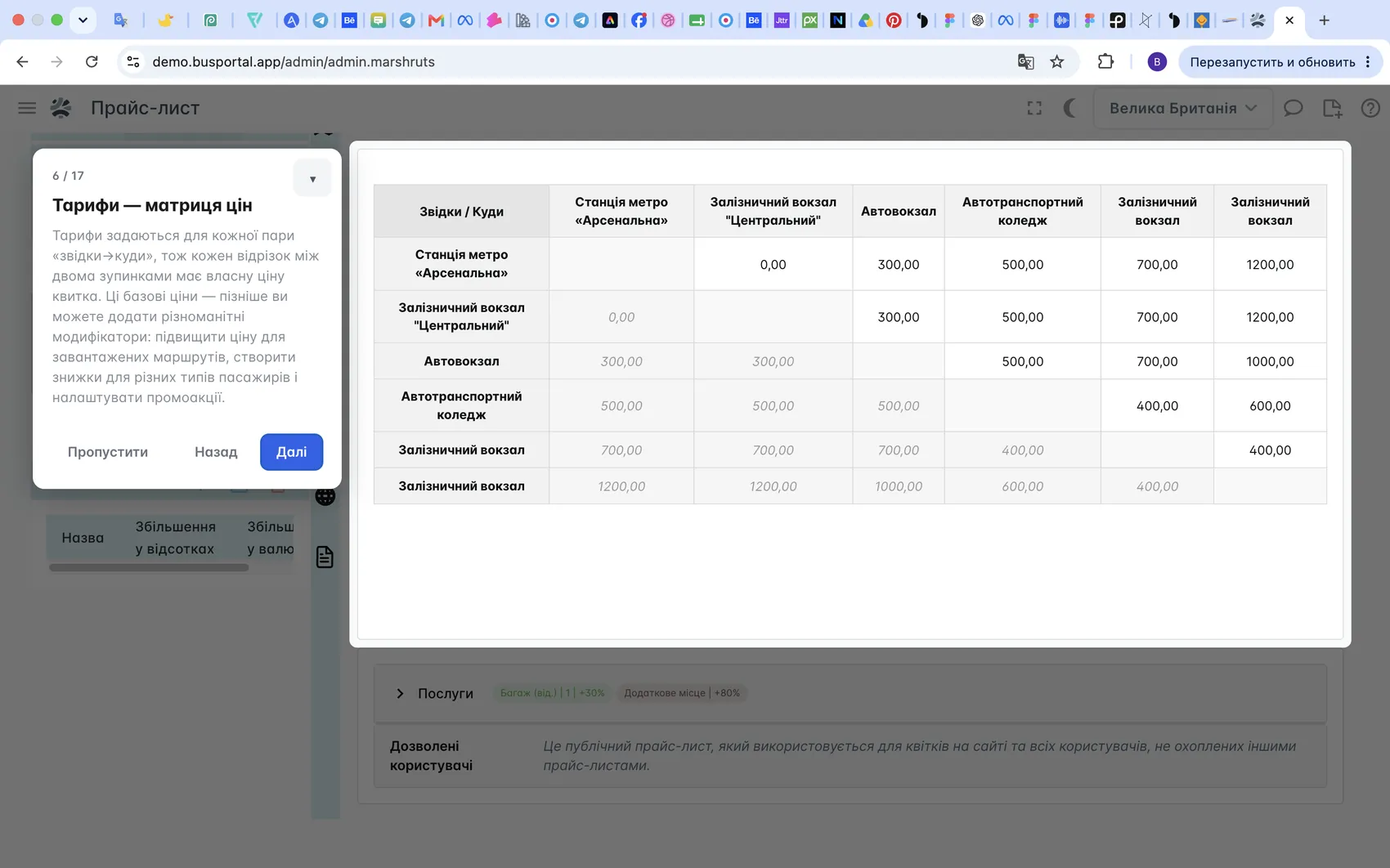
Bookings, tickets, payments and expenses are all linked to each other. A manager can analyze revenue, cash flow, cash desk activity, trip occupancy and the results of individual routes.
The driver can upload a photo of a receipt or a PDF from the trip. The system recognizes the category, amount and date, then the accountant checks it and posts the expense.
Driver, vehicle, route and trip documents are kept separately, with control over validity dates, inspections and replacement history.
Learn more: Financial records for bus operators
Reports and summaries
Reporting for a bus carrier
In BUSPORTAL reporting is built automatically from the data on bookings, tickets, payments, trips and expenses. The carrier does not have to move information into separate spreadsheets by hand: account balances, trip results and route figures are available in the system.
- Account balances. Current balances of the cash desk, the bank accounts, the drivers and the counterparties, plus a log of every operation with filters.
- Trip cash report. All payments for a particular trip, broken down by payment method and converted into a single currency. The report can be exported in XLSX format.
- Trip manifest. The list of passengers with seat numbers, contact details, boarding and drop-off points and ticket statuses.
- Trip expenses. Costs by category — fuel, tolls, parking, repairs, meals and others — with the receipts and documents attached.
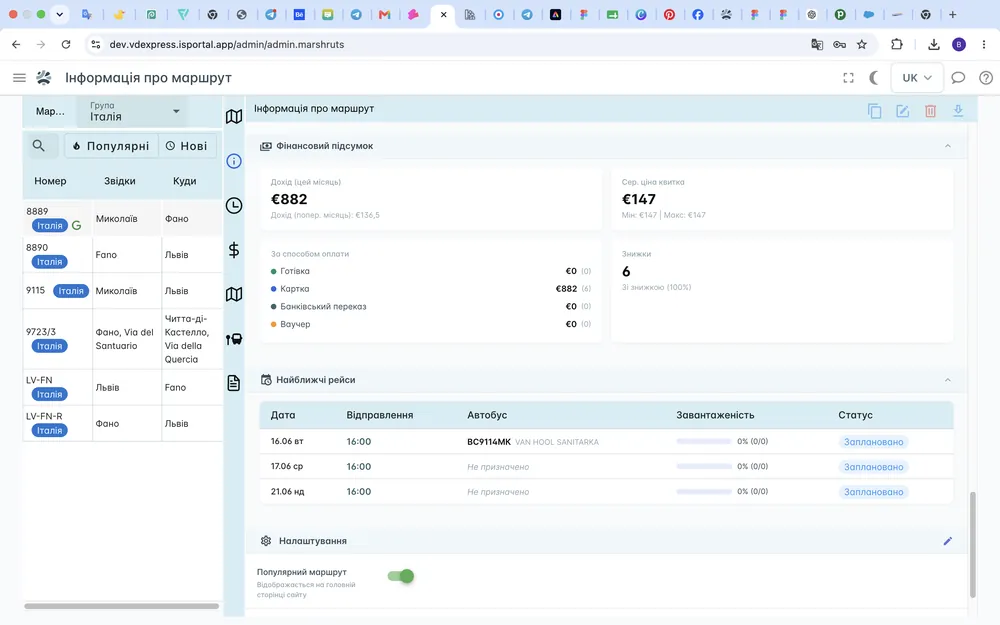
- Route financial summary. Income for the current and the previous month, the average, minimum and maximum ticket price, and the split of payments: cash, card, bank transfer, vouchers and discounts.
- Monthly route figures. The number of bookings, the income, the average bus occupancy, punctuality, cancellations and passenger no-shows, compared with the previous period.
Reports can be viewed for a specific trip, for a route or for a chosen period. That makes it easy to see which trips make a profit, where costs are rising and how the occupancy of routes is changing.
City and route statistics
Passenger flow analytics
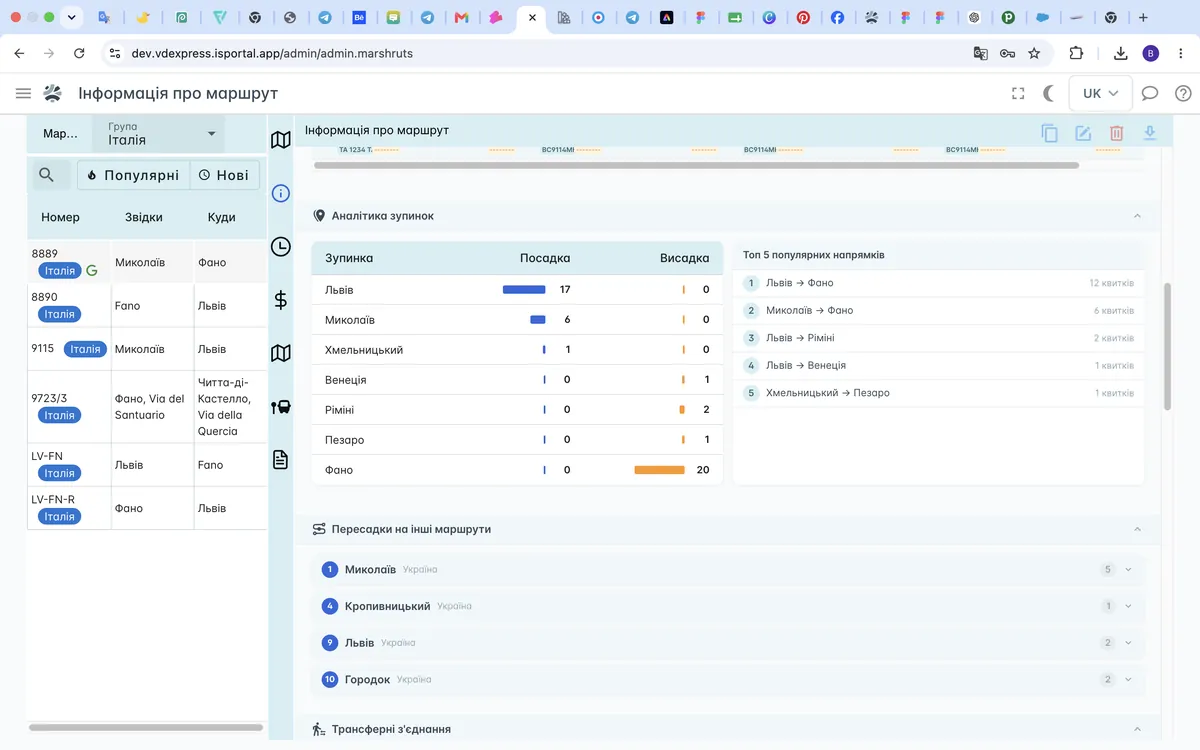
Passenger flow analytics shows where passengers board and get off, which cities they pass through in transit and how individual trips fill up. This data helps decide whether a particular stop is needed, whether another trip is worth adding and which cities generate the main flow of passengers.
Statistics by city
For every city the system shows:
- the number of trips
- the number of boardings and drop-offs
- the transit passenger flow
- the seats still available
The data is shown for a period of six months: three months before the current date and three months after it, planned trips included.
Opening an individual city, the carrier sees which trips pass through it, how many passengers board and get off, how many carry on with their journey and how many seats stay free on the following legs of the route.
Route analytics
For every route BUSPORTAL shows the daily number of passengers and of completed or planned trips within a 30-day window: 15 days before the current date and 15 days after it.
Passenger flow is calculated from paid tickets. The occupancy of the nearest trips is shown separately, which helps add vehicles in time, adjust the schedule or merge trips with low demand.
Loyalty and repeat trips
Remarketing and repeat sales
BUSPORTAL does more than process new bookings, it brings passengers back for their next trip. Remarketing builds target audiences from the actual history of trips, purchases and customer interactions.
BUSPORTAL helps you single out new, active, regular and VIP passengers, along with customers at risk of churn, a dormant audience and passengers worth winning back with a special offer.
Each segment can get its own marketing campaign: suggest another trip, announce a new route, launch a seasonal promotion or give regular customers a personal offer.
Passengers can be segmented by:
- date of their last trip
- number of trips and tickets bought
- total spend and average order value
- popular routes and destinations
- countries and cities they travel to
- available contact channels
- source of their first booking
- customer lifecycle stage
Communication channels
Campaigns over email, SMS, Viber and Telegram
Marketing messages can go out over email, SMS, Viber and Telegram. Before launch, BUSPORTAL shows the projected reach for the whole audience and for each channel separately.
For each recipient the system can generate a unique promo code with a set discount and expiry date. BUSPORTAL respects marketing consent, unsubscribes and frequency limits, so passengers are not flooded with the same offers.
The marketer can:
- pick a ready-made audience or build their own
- prepare the message template
- preview the message before sending
- set the channel priority
- add a personal promo code
- send the campaign right away or schedule it for a chosen time
- review the delivery results
AI assistants and support
Multichannel communication with passengers
BUSPORTAL supports marketing and service messages over email, SMS, Viber and Telegram. Telegram also offers a two-way scenario: the passenger talks to a bot and an AI assistant, and a difficult question can be handed over to a live operator.
The operator receives the inquiry in an internal Telegram topic and replies to the passenger without losing the conversation history. In the BUSPORTAL web interface you can browse dialogs, filter them by channel and status, find inquiries with no reply, see the moment the AI handed over to an operator and archive finished conversations.
Sending a reply straight from the web interface is not part of the current scenario: live operator replies in two-way dialogs go through Telegram.

Industry solution
A CRM for carriers or a general-purpose CRM
A general-purpose CRM stores contacts, deals and tasks, but it does not account for the specifics of passenger transport: trips, seat maps, seats, tickets, passenger boarding and the movement of the bus. These are exactly the processes where a carrier makes most of its mistakes.
In passenger transport the main object of record is not a deal but a specific journey. It has a date and a time, a route, a bus, a seat map, a passenger list, fares and a financial result.
If a seat is sold through the website, it has to become unavailable to the dispatcher, the driver and the other sales channels at once. The price of a ticket may depend on the pair of cities, the passenger category, the seat chosen and the extra services. Once the trip is over, the information about tickets, payments and expenses has to reach the reporting automatically.
To handle processes like these, a general-purpose CRM has to be connected to a booking system, the website, GPS monitoring, payment services, the driver app and financial records. As a result the data is spread across different systems, and every integration needs to be looked after separately.
BUSPORTAL was built as an industry CRM for bus carriers. Bookings, trips, seats, passengers, drivers, GPS monitoring, payments and finances work as parts of one system from the start.
Learn more:
Side-by-side comparison
BUSPORTAL instead of Excel and chats
| Manual record-keeping | BUSPORTAL CRM |
|---|---|
| Scattered spreadsheets and lists | One database of bookings and passengers |
| Checking free seats by hand | A live interactive seat map |
| Payment details buried in chats | Payment status on the booking card |
| Paper lists for the driver | The passenger list on a phone |
| No single change history | A stored history of every operation |
| The customer base sits unused | Segmentation and remarketing campaigns |
| Sales totaled by hand | Financial analytics per trip |
| Calls asking 'Where is the bus?' | A public GPS map right in the e-ticket |
Manual record-keepingBUSPORTAL CRM
Manual record-keeping
Scattered spreadsheets and lists
BUSPORTAL CRM
One database of bookings and passengers
Manual record-keeping
Checking free seats by hand
BUSPORTAL CRM
A live interactive seat map
Manual record-keeping
Payment details buried in chats
BUSPORTAL CRM
Payment status on the booking card
Manual record-keeping
Paper lists for the driver
BUSPORTAL CRM
The passenger list on a phone
Manual record-keeping
No single change history
BUSPORTAL CRM
A stored history of every operation
Manual record-keeping
The customer base sits unused
BUSPORTAL CRM
Segmentation and remarketing campaigns
Manual record-keeping
Sales totaled by hand
BUSPORTAL CRM
Financial analytics per trip
Manual record-keeping
Calls asking 'Where is the bus?'
BUSPORTAL CRM
A public GPS map right in the e-ticket
Success stories
Results at VD-EXPRESS
For the international carrier VD-EXPRESS, BUSPORTAL brought together the online sales website, bookings, trips, passengers, transfers, drivers, GPS monitoring and finances.
After the implementation the carrier halved the time it takes to board passengers, eliminated double bookings and moved trips off paper documents entirely.
- 600+bookings a month
- 2active routes
- 25%of tickets sold online
- 8transfer geo-zones
- 11vehicles
Step by step
How CRM implementation works
- We look at your routes, your sales channels and how the team works.
- We set up the company structure, the users and their access rights.
- We add vehicles, seat maps, routes, schedules and prices.
- We connect the sales channels you need, plus payments and GPS.
- We train dispatchers, administrators and drivers.
- We help you go live and support your work from there on.
The BUSPORTAL configuration adapts to each carrier's own processes.
Frequently asked questions
How is BUSPORTAL different from a general-purpose CRM?
BUSPORTAL is built specifically for bus carriers. Trips, stops, schedules, seat maps, tickets, transfers, driver work, GPS, remarketing and financial records are all there from the start.
Can we bring our data over from Excel?
Routes and stops are imported from an Excel file. The rest of the structure, meaning vehicles, seat maps, schedules and prices, we set up together with you during implementation. Booking history does not have to be migrated: remarketing segments are built from the trips and purchases that already run through the system.
Is the CRM a fit for a small carrier?
Yes. How much setup is needed depends on how many routes you run and which sales channels you want: only the ones you actually use get connected. For a sense of scale, the VD-EXPRESS case on this page is 2 active routes and 11 vehicles.
Can we connect our own website?
Yes. BUSPORTAL connects to the carrier's own website: the passenger finds a trip, picks a date and a seat, pays for the order and receives an e-ticket, while schedules, prices and seat availability come straight from the CRM. That gives you a sales channel of your own and cuts your dependence on intermediaries.
Can we use our existing GPS trackers?
The system works with Teltonika GPS hardware and with other manufacturers' devices whose protocols are supported or can be integrated. If a vehicle has no dedicated device, the coordinates can be sent by the software tracker in the driver app.
How does remarketing work in BUSPORTAL?
The system builds target audiences from the actual history of trips, purchases and customer interactions: the date of the last trip, the number of trips, total spend, popular destinations, contact channels and lifecycle stage. For each segment the marketer prepares a campaign, sets the channel priority (email, SMS, Viber, Telegram), can add a personal promo code and review the delivery results.
Can we reply to passengers from the web interface?
Not yet. In the web interface you can browse dialogs, filter them by channel and status, find inquiries with no reply, see the moment the AI handed over to an operator and archive finished conversations. Live operator replies in two-way dialogs go through Telegram.
Can drivers work from a smartphone?
Yes. In the mobile interface the driver sees the passenger list, the boarding and drop-off points, the seat map, payment statuses, luggage and extra services, scans QR tickets, checks passengers in at boarding, sends GPS coordinates and uploads receipts and documents from the trip. Changes sync with the CRM, so the dispatcher sees the current picture.
Can we limit what employees have access to?
Yes. Access is defined by roles and rights: each employee sees only the sections and actions they need. The company structure, users and access rights are set up at the second step of implementation and can be changed later whenever you need.
Move the whole transport operation into one system
BUSPORTAL helps you keep control of bookings, passengers, trips, drivers, the fleet, repeat sales and finances without scattered spreadsheets or manual double entry.
We will show you how BUSPORTAL will work on your company's routes.