
Bus ticket booking system
BUSPORTAL is a system for booking seats and selling bus tickets through the website, the admin panel, messengers and the carrier's other sales channels.
We will walk through the booking process on your own routes and fares.
A trip booking system for a bus operator
The BUSPORTAL trip booking system brings free seats, fares, tickets and payments together in one registry. Orders from the website, the admin panel, a Telegram bot, e-mail or the driver land in the shared database straight away. Seat availability is updated for every channel, so dispatchers do not have to reconcile lists by hand and the carrier avoids double bookings and sales errors.
When requests arrive by phone, through the website, by email and in messengers, the dispatcher has to move the information across by hand. Data gets duplicated, free seats are shown incorrectly, and passengers can be told contradictory things.
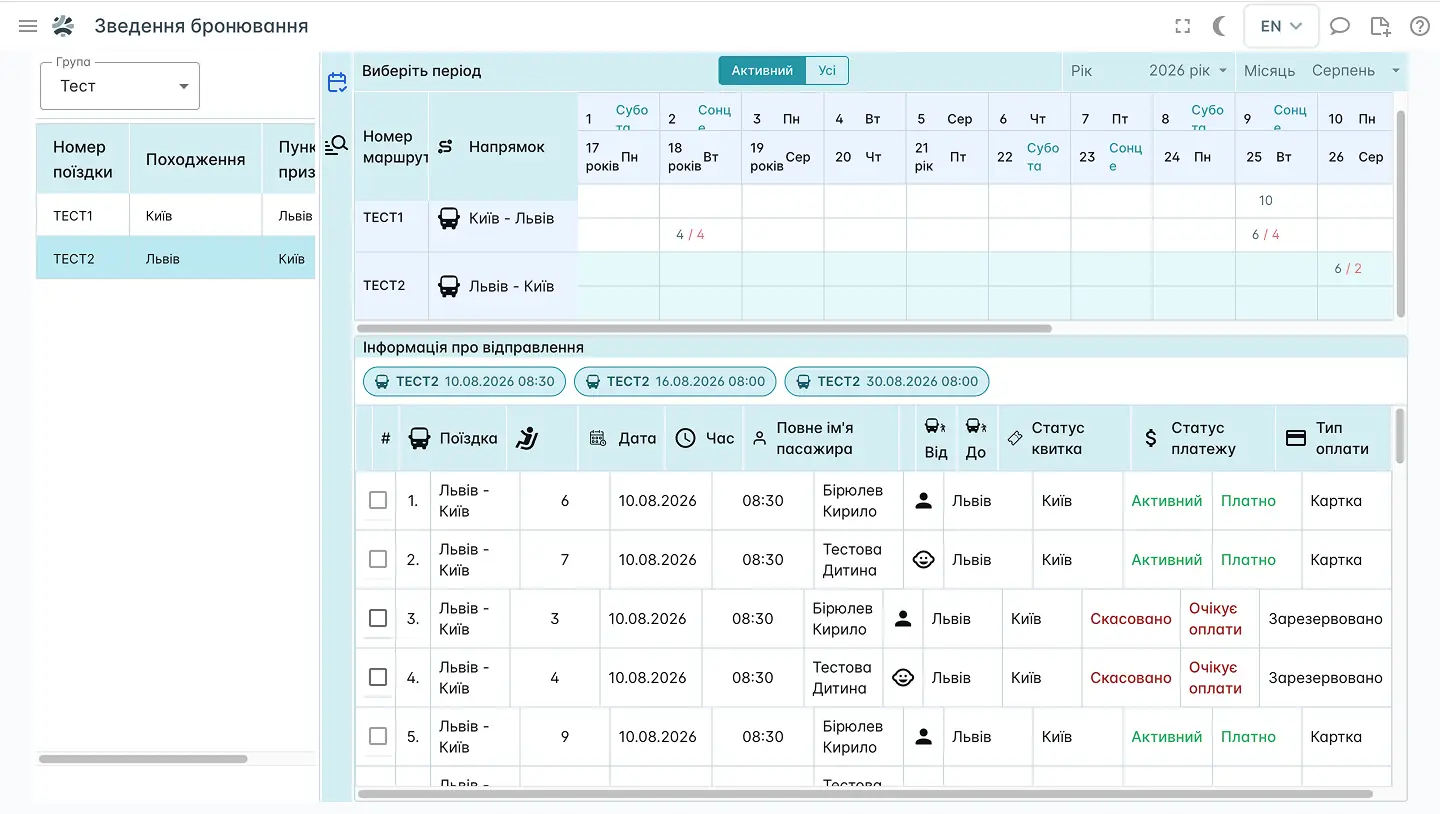
BUSPORTAL brings bookings from every connected channel into a single registry.
ONE REGISTRY
Every sales channel in one registry
The carrier's team sees:
 who created the booking and when
- the route, trip and departure date
- each passenger's seat
- customer contact details
- booking and payment status
- the channel the order came from
- extra services
- change history
- cancelled and expired reservations
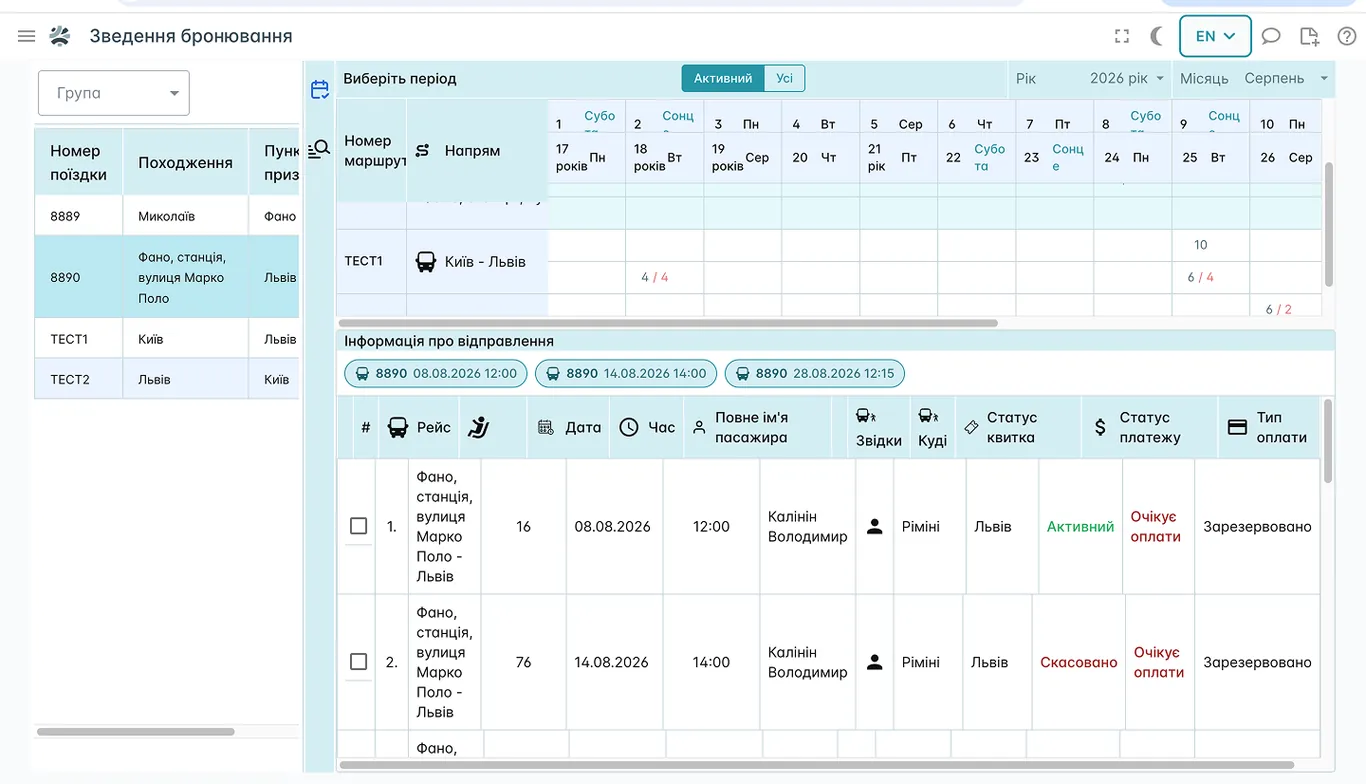
BOOKING OVERVIEW
 TRIP: Lviv-Fano (Italy)
BUSPORTAL stores the channel an order came from in every booking card. That is more than a reference label: sales can be opened or closed separately for each channel. If a trip is closed in the Telegram bot, for example, it disappears there only — it stays available on the website, in the admin panel and in the other connected channels.
Orders arrive from:
- the carrier's website
- the admin panel, where the booking is created by a dispatcher or a call-centre operator
- a Telegram bot
- the driver app while the passenger is boarding
- e-mail — the system reads the details out of the message and creates a draft booking, which an employee then checks and confirms
- an external API used to connect partner services
As a result every order is kept in one registry, and the carrier controls the availability of trips and seats separately for each sales channel.
Learn more: CRM for bus operators
The live seat map is shared by every sales channel. If a seat is already sold or reserved, the system will not let anyone book it again.
A booking lands in the carrier's system automatically. The dispatcher does not re-enter the data or update the passenger list by hand.
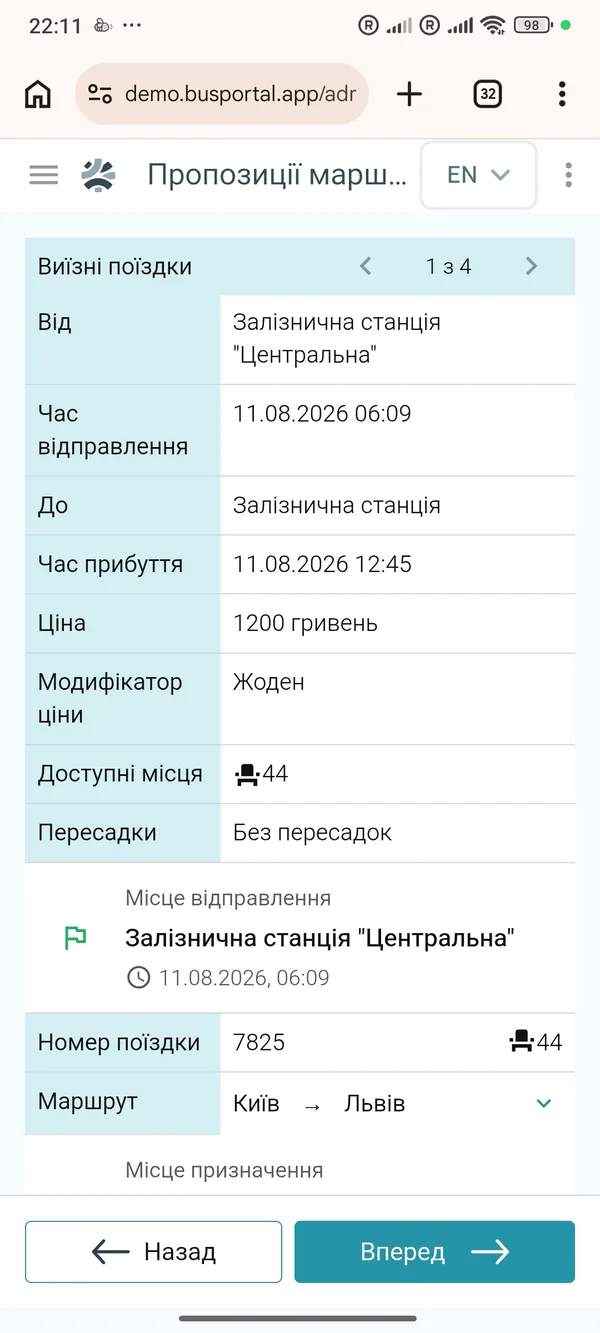
trip search
Search for direct and connecting trips
BUSPORTAL helps the passenger find not just a direct bus, but also journeys with a connection or with a transfer leg to the bus.
The search takes into account:
- cities and individual stops
- alternative place names
- the dates trips actually run
- seat availability
- connection options
- a transfer to or from the bus
- the current price of the journey
Learn more: Website for a bus operator
SEAT MAP
Choosing a bus seat online
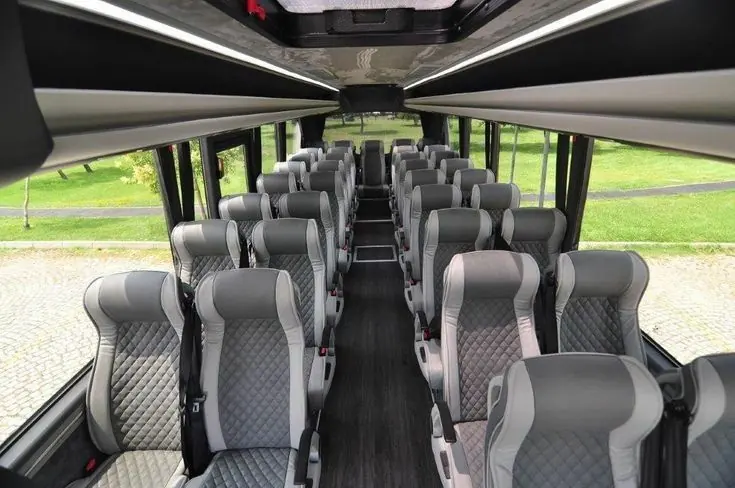
The passenger chooses a bus seat online — on the seat map of the very vehicle that runs the trip, not on a generic rectangle. The passenger sees the live seat map and picks a comfortable seat themselves.
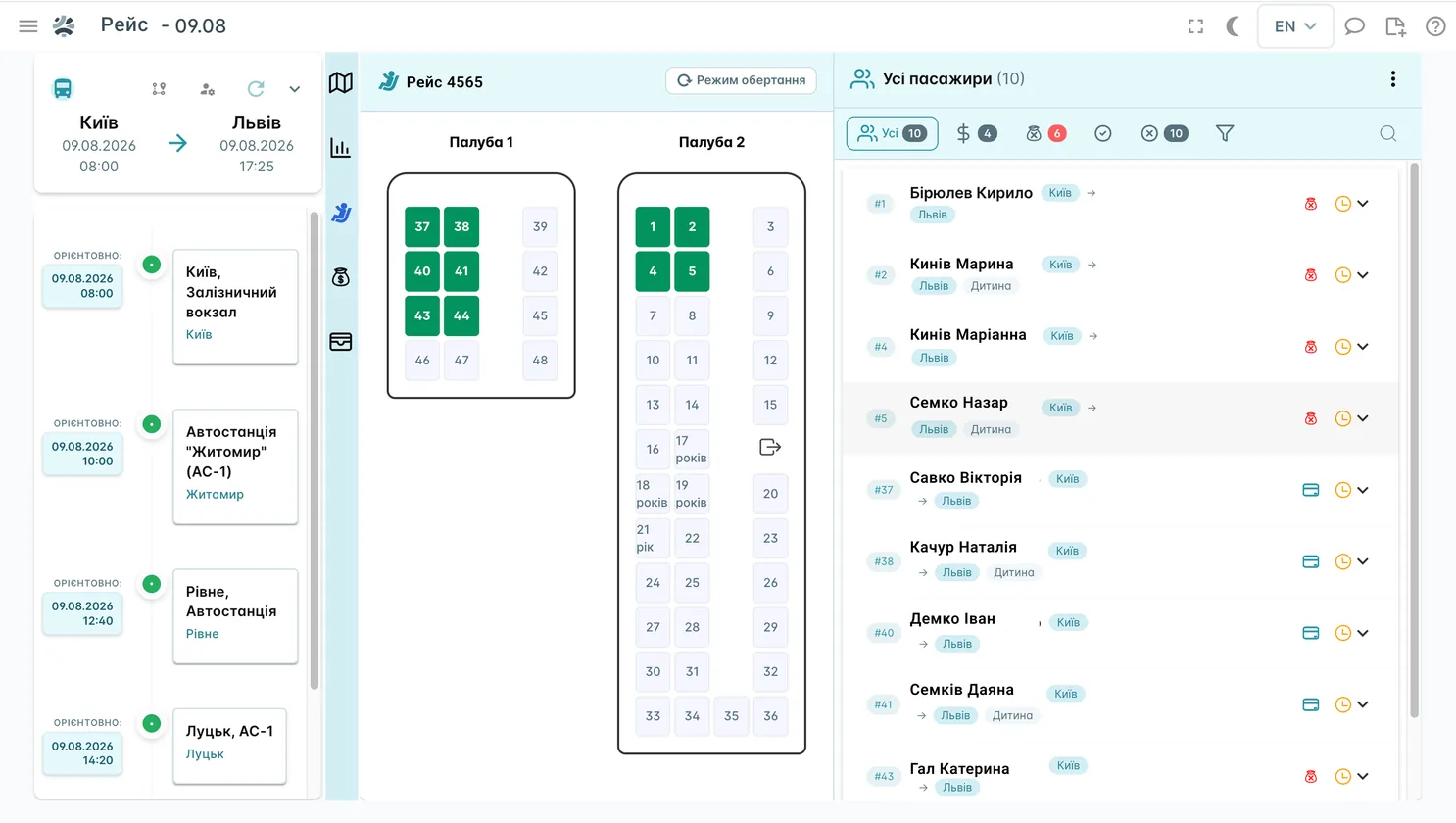
The map shows:
- free seats
- sold seats
- temporarily reserved seats
- seats the passenger has selected
- seats closed by the carrier
- single-deck or double-deck bus layouts
If the vehicle for a trip changes, the dispatcher can assign a different seat map and check where the passengers end up.
Learn more: Driver app
E-TICKET
E-tickets and QR tickets for the bus
After payment the passenger receives an e-ticket with a QR code. There is no need to print it: showing the ticket on a phone screen is enough, and the driver checks it in the BUSPORTAL app.
The ticket carries every detail of the journey: the trip, the departure date and time, the boarding and drop-off points, the seat number, the passenger details, the price and the extra services, paid luggage among them. A link in the ticket opens the live map of the bus, so the passenger can check where it is without calling the dispatcher.
QR boarding without paper lists
During boarding the driver scans the QR code with the phone camera. The app finds the ticket in the trip list and shows the passenger card: the seat, the payment status, the luggage and the drop-off point. The driver confirms boarding, and the dispatcher sees the updated status in the system right away.
This speeds up ticket checks, cuts down on mistakes and gives the dispatcher up-to-date information about boarding in real time.
TICKET RECORDS
Bus ticket accounting system
BUSPORTAL automatically keeps the full history of every ticket: when and through which channel it was created, who made changes, how the payment came in, whether the passenger boarded and how the journey ended. The carrier does not have to keep a separate log or move data between systems by hand.
- Creation. The booking arrives from a connected sales channel, and the system assigns the chosen seat to the passenger.
- Payment. The ticket gets the matching status depending on how it was paid: online, in cash to the driver, at the office or by bank transfer.
- Changes. Moving to another seat, changing the drop-off point, adding luggage or another service are stored in the ticket history together with the time and the employee.
- Boarding. The driver scans the QR code or finds the passenger in the trip list and switches their status to 'On board'.
- Completion. After drop-off the ticket is closed, and the details of the passenger, the payment and the services provided go into the trip reporting.
- Refund. If the passenger cancels the journey, an employee processes the refund as a separate operation. The system stores the amount, the date and the user who confirmed it.
Selling and refunding a ticket on the spot
An employee with the 'Cashier' role handles the sale directly in BUSPORTAL: picks the trip, the seat and the fare, enters the passenger, takes the payment and prints the ticket.
The right to process refunds is configured separately for each role. Employees without that permission do not see the action, and every refund that goes through stays in the ticket history. This helps keep control of cash operations and of who is accountable for them.
FARES
Fares, extra services, discounts and promo codes
The system lets you set up:
- base fares between any two stops on a route
- separate prices for adults, children, concession passengers and other categories
- charges for luggage above the standard allowance
- paid selection of a specific seat
- a surcharge for premium seats or a particular class of seating
- buying the free seat next door for extra comfort
- a transfer to the bus or from the bus to the final address
- payment and price display in different currencies
BUSPORTAL builds the final price of a journey from the route, the seat, demand, the passenger type and the extra services chosen.
Learn more: Dispatch software
How the system prevents overbooking
The website, the admin panel, the Telegram bot, the driver app and every other sales channel work from a single live seat map. BUSPORTAL checks availability at the moment the ticket is created: if the seat is already taken or reserved, a second booking will not be confirmed.
One availability for every channel
The number of free seats is not stored as a separate figure that has to be updated by hand. The system works out occupancy from the active tickets and reservations of that particular trip. That is why the website, the dispatcher, the driver and the connected services all see the same seat availability.
A temporary hold while payment goes through
When a passenger moves on to payment, the chosen seat is temporarily taken off sale. For standard online booking the hold can last 15 minutes. If the payment does not arrive within that time, the booking is cancelled automatically and the seat becomes available again.
Bookings created by a dispatcher or a driver have no automatic timer: an employee cancels them when needed.
Instant seat map updates
Sales channels are told about a change in availability straight away. If a passenger is filling in their details while the chosen seat is bought through another channel, the seat map updates and the seat is removed from the selection before payment.
The system also checks the order itself: one seat cannot be assigned to two passengers within the same booking. This double check reduces the risk of overbooking both across sales channels and inside a single order.
AUTOMATIC PROCESSING
Automatic processing of ticket orders
Requests from e-mail, messengers or handwritten notes do not have to be typed into BUSPORTAL by hand. The system recognises the passenger details, creates a draft booking, and the dispatcher only has to check it and confirm.
BUSPORTAL picks out the passenger's name and phone number, the travel date, the route, the number of passengers and the chosen seats. The original message is stored together with the draft, so the dispatcher always sees the source of every value and can compare the result before saving.
The system also recognises photos of handwritten notes. If a notebook page lists several passengers, BUSPORTAL splits them into separate draft bookings. The recognised data is laid over the original image — the employee can check and correct every field.
Once confirmed, the booking becomes part of the shared registry: it takes a seat on the seat map, gets a channel and a status, and goes through the same checks as an order from the website or the admin panel.
END-TO-END SCENARIO
The path of one ticket: from order to trip report
A ticket goes through the whole cycle in one system — from choosing the trip to the financial report. At every stage BUSPORTAL stores the sales channel, the seat, the payment, the changes and the passenger status.
- Order. The passenger chooses a trip on the carrier's website, in the Telegram bot, or contacts the dispatcher. BUSPORTAL creates the booking and records the channel it came from.
- Seat. The chosen seat is assigned to the passenger in the shared seat map. In the other sales channels it immediately stops showing as available.
- Payment. The ticket status changes after an online payment, after cash is taken at the office or paid to the driver. If an online order is not paid within the set time, the hold is released and the seat goes back on sale.
- Ticket. Once the payment is confirmed, the passenger receives an e-ticket with a QR code, the journey details and a link to the live map of the bus.
- Boarding. The driver scans the QR code and sees the passenger card: the seat, the payment status, the luggage and the drop-off point. Once boarding is confirmed, the dispatcher immediately sees that the passenger is on board.
- Report. After the trip ends, the ticket data automatically builds the cash report and the financial summary: the number of passengers, the amount taken, the payment methods, the extra services and the refunds processed.
Every stage is tied to the same ticket, so the dispatcher or the accountant does not have to match passenger lists, payments and trip results by hand.
Learn more: QR boarding in the driver app and your own ticket sales website.
FAQ
Can we sell tickets through our own website?
Yes. The carrier's website works as one of the sales channels: bookings made there land in the same registry as orders from the admin panel, messengers and every other connected channel.
Can bookings be created over the phone?
Yes. The dispatcher finds the right trip and creates the booking in the admin panel while talking to the passenger.
How does the system prevent double bookings?
The website, the admin panel and every other channel work from the same live seat count. When a passenger moves on to payment, the chosen seat is held for them, and for standard online booking that hold can last 15 minutes. If payment is not completed, the seat goes back on sale automatically.
Can we close the last seats to online sales?
Yes. The seat map has a separate state for 'seats closed by the carrier' and those seats are not offered to the passenger during online booking.
Can different bus layouts be used?
Yes. The seat map is configured for a single-deck or a double-deck bus. If the vehicle for a trip changes, the dispatcher can assign a different seat map and check where the passengers end up.
Are tickets supported in different currencies?
Yes. The fare settings cover payment and price display for a journey in different currencies.
What if the passenger has not printed the ticket?
Nothing. Showing the QR code on the phone screen is enough. If the phone is dead, the driver finds the passenger in the trip list by surname or seat number.
Can a ticket be checked without an internet connection?
Yes. The driver app keeps the trip's passenger list on the phone, so boarding carries on in areas with no coverage. Boarding marks are synchronised once the connection is back.
Bring the website, the dispatch desk, e-tickets, payments, seats and passengers into one system.
BUSPORTAL adapts to your company's routes, sales channels and business processes.